A gaming mouse is the one piece of your setup that touches every single action, so the difference between a good one and a great one shows up in every flick, track, and click. The trouble is that the spec sheets are loud, the DPI numbers keep climbing into the tens of thousands, and almost none of it maps to how the mouse actually feels in your hand. We analyzed thousands of verified buyer reviews, recent sales data, and expert evaluations to find seven gaming mice that get the fundamentals right instead of just the marketing.
Our Best Overall pick: a genre-agnostic wired mouse that RTINGS, PC Gamer, TechRadar and Tom's Guide all reviewed favorably, praising its TrueMove Air sensor accuracy, 9-button layout and durable shell built for consistent tracking.
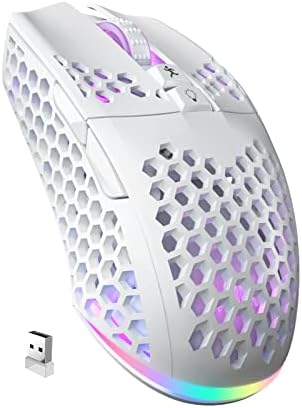
A budget tri-mode mouse that pairs 2.4GHz, Bluetooth 5.1 and USB-C wired connections in one honeycomb-shell body, with a light 90g frame reviewers single out for long sessions.
Redragon M810 Pro Wireless Gaming Mouse (10,000 DPI)
4.9
10,000 DPI · 8 macro buttons · 45-hr battery
Our Best Affordable pick: a full-size wireless mouse with 8 programmable macro buttons, a dedicated rapid-fire key and a claimed 45 hours of eco-mode battery life, at the lowest price among the available mice in this lineup.
A full-featured wired mouse built around Razer's Focus+ 26,000 DPI sensor, a contoured ergonomic shape and a tilt-adjustable scroll wheel with multiple click modes. Reviewers consistently praise its comfort and low click latency, with weight as the main tradeoff for fast-flick play.
Our pick for competitive gaming: a flagship-tier PixArt PAW3395 optical sensor and Kailh GM8.0 switches in an ultralight 49g ambidextrous shell, with grip tape already applied out of the box for a no-slip grip during fast flicks.
SOLAKAKA SM809 Pro Wireless MMO Gaming Mouse (9 Side Buttons)
4.7
24,000 DPI · 9 side buttons · tri-mode wireless
A tri-mode wireless MMO mouse with a 9-button side grid, 16 programmable macros and a 24,000 DPI PixArt sensor in a honeycomb shell. The most button-heavy mouse here, aimed at MMO and MOBA players rather than FPS flick shooters.
A budget-friendly wireless MMO mouse built around 16 programmable buttons and a PixArt PAW3335 sensor rated to 16,000 DPI, with a battery independent testers clocked at up to 70 hours per charge. RTINGS and other testers class its sensor as merely average for the price and better suited to MMO and casual play than fast-twitch FPS.
Short on time? These three cover most buyers: our Best Overall SteelSeries Rival 5, the Best Affordable Redragon M810 Pro, and the Best for Competitive Gaming Attack Shark X3.
Understand the category before you buy - what the science actually says, and which specs matter.
Every gaming mouse promises pinpoint precision and a giant DPI ceiling, but the number on the box is rarely the thing that decides your aim. Here is how a gaming mouse actually works, why the headline DPI figure is mostly a bragging contest, and the handful of specs that genuinely change how you play.
What does a gaming mouse actually do?
At its core, a gaming mouse tracks movement fast and reports it to your PC often, then puts extra buttons and controls under your fingers. A few things set it apart from an office mouse:
A high-quality optical sensor that reads surface movement cleanly, without smoothing or jitter
A fast polling rate, so the mouse tells your computer where it is many times per second
Durable switches rated for tens of millions of clicks
Programmable buttons for reloads, abilities, or macros
A shape and weight tuned for fast, repeated motion
The lineup here spans the full range of that idea, from the 85g SteelSeries Rival 5 built for consistent, accurate tracking to the 175g Redragon M908 Impact with 12 dedicated side buttons for MMO players who want a whole hotbar under their thumb.
Why the headline DPI number is a marketing arms race
This is the part worth understanding before you pay extra for a bigger number. DPI, sometimes labeled CPI, is how far your cursor travels for a given hand movement. The ceilings in this lineup run from 8,000 DPI on the SOLAKAKA SM600 all the way up to 26,000 DPI on the Razer Basilisk V3. It sounds like a meaningful gap. In practice it is almost never one.
Here is why. The overwhelming majority of players, including professionals, play somewhere in the low thousands of DPI, often between 400 and 3,200. At those settings a mouse can already move your cursor across several monitors with a flick of the wrist. Push a sensor to 26,000 DPI and the cursor becomes so twitchy it is unusable for actual aiming. So a sky-high DPI ceiling is a spec you will never turn on. It tells you the sensor is modern, and little else.
What actually decides feel and aim is quieter and harder to print in bold:
A clean, well-regarded sensor that tracks without smoothing, like the PixArt-family optics in the Redragon M810 Pro and the TrueMove Air sensor in the SteelSeries Rival 5
A high polling rate, where the standard 1,000 Hz used across this lineup is already excellent for the overwhelming majority of players and displays
Low weight for fast flicks, which is why competitive players chase lighter designs like the 85g SteelSeries Rival 5 over heavier bodies
Good switches with a crisp, consistent click and a long lifespan
And modern 2.4GHz wireless, using a small dedicated dongle, is now effectively as fast as a cable, so a wire is a preference rather than a requirement. The wireless models here, from the SOLAKAKA SM600 to the Redragon M810 Pro, are built for competition, not convenience.
Which specs actually matter?
Once you stop chasing the DPI headline, a few features decide which mouse fits you:
Sensor quality: Look for a named, respected optical sensor over a raw DPI figure. Clean tracking beats a big number every time.
Polling rate: 1,000 Hz, the rate on every mouse here, is smooth and responsive for the vast majority of players and displays.
Weight: This lineup runs from 59g to 175g. Lighter suits fast, flick-heavy shooters; heavier or a tunable model like the Redragon M908, which adds eight removable 2.5g weights, suits slower, deliberate aim.
Connectivity: Wired never needs charging, while a good 2.4GHz wireless mouse gives you the same responsiveness without the drag. Some, like the SOLAKAKA SM600, add Bluetooth for laptops on the side.
Buttons: Match the count to your genre. Shooters want a clean 7 to 9 buttons; MMO and MOBA players lean on 16 or more, like the Redragon M908.
Battery life: On wireless models this ranges widely, from around a day or two on the SOLAKAKA SM600 with RGB running to up to 70 hours on the AOC GM401, so factor in how often you want to recharge.
How we grade products
Graded Picks rankings are aggregated from several independent signals: verified buyer ratings and the size of the review base for credibility, recent monthly purchase volume for relevance, assessments from trusted PC gaming and hardware publications, and how each product places in leading category lineups. For gaming mice we weigh:
Sensor quality and tracking consistency
Polling rate and responsiveness
Weight and shape for the intended play style
Wireless reliability and battery life
Switch quality and button count
Software and macro flexibility
Overall value for the price
Comfort and fit note: The best mouse on paper is the wrong one if it does not match your hand size and grip. Weight, length, and shape matter more to long-session comfort than any sensor figure, so if you can, match the mouse to how you actually hold it, palm, claw, or fingertip, and give a new shape a few days before you judge it.
In-Depth Reviews
Everything we learned from buyer reviews and expert testing, product by product.
The Rival 5 earns our Best Overall pick on the strength of broad, consistently positive professional coverage: RTINGS, PC Gamer, TechRadar, Trusted Reviews and Tom's Guide all tested it, and the consensus lines up on accurate, consistent tracking from the TrueMove Air optical sensor (up to 18,000 CPI), a wired connection that keeps response times predictable under pressure, a shell rated for 80 million clicks that testers describe as free of creaking or cheapness, and 10-zone PrismSync RGB that multiple reviewers called the brightest in its class. Nine programmable buttons, five of them within thumb reach, cover FPS, MOBA, MMO and battle royale playstyles without needing a specialty shape, and testers confirm claw, fingertip and palm grips all work comfortably on its body. The honest caveats echoed across reviews: the forward-most thumb paddle is genuinely hard to reach mid-fight, and it's wired only, so anyone set on a cable-free desk should look elsewhere in this lineup.
Sensor / max DPITrueMove Air optical, up to 18,000 CPI
ConnectivityWired (USB, 2m Super Mesh cable)
Polling rate1,000 Hz / 1ms
Programmable buttons9 buttons
Weight85g
Battery lifeWired - no battery to charge
RGB lighting10-zone PrismSync RGB
Pros
Broadest, most consistently positive expert coverage in this lineup
TrueMove Air sensor (18,000 CPI) delivers accurate, consistent tracking
9 programmable buttons work across FPS, MOBA, MMO and battle royale
Shell rated for 80 million clicks - testers report zero creak or flex
10-zone PrismSync RGB rated the brightest in its class
Cons
Forward-most thumb paddle is hard to reach in the heat of a match
Wired only - no wireless option
Tiny thumb-button spacing takes practice to use reliably
Who is it for?
Competitive and multi-genre players who want a well-reviewed, accurate wired mouse at a moderate price.
Who is it not for?
Anyone who specifically wants a cable-free desk - this is a wired-only mouse.
The SM600 leans on flexibility more than any other mouse in this lineup: reviewers at TheGamersMag and Goods.Observer both call out the unusual combination of 2.4GHz wireless, Bluetooth 5.1 and USB-C wired modes in a single mouse, letting it pair with a gaming PC, a laptop and a tablet without swapping dongles. Seven programmable buttons and six DPI steps up to 8,000 give it real customization for a mouse in this price range, and the honeycomb shell keeps the body down to about 90g, which reviewers describe as noticeably light in hand over long sessions. A 600mAh battery is rated for 15 to 20 days with RGB off, dropping to a day or two with the lighting running constantly. The obvious ceiling: it is a right-hand-only shape, and its plastic honeycomb shell won't feel as premium as the SteelSeries or Logitech mice here.
Sensor / max DPIOptical sensor, up to 8,000 DPI (6 levels)
3. Redragon M810 Pro Wireless Gaming Mouse (10,000 DPI)
4.9
Our Best Affordable pick. The M810 Pro is built for gamers who want a full feature set without paying flagship prices, and reviewers consistently frame it that way: "premium features on a budget" is the recurring theme across independent write-ups. A PixArt PMW3325 sensor delivers up to 10,000 DPI with a 1,000Hz polling rate, and the contoured, right-handed shape is sized for palm and claw grips on larger hands. All 8 buttons remap freely, and the dedicated rapid-fire key stands out for anyone who plays titles that reward fast repeated inputs. Redragon rates the battery at up to 45 hours in eco mode with RGB dimmed, and reviewers note real-world life varies with DPI and lighting settings, as it does on any wireless mouse. It won't match the sensor precision or build refinement of the SteelSeries or Razer mice here, but it undercuts every other mouse in the lineup on price while packing in more buttons and features than most of them.
Sensor / max DPIPMW3325 optical, up to 10,000 DPI
Connectivity2.4GHz wireless + USB-C wired
Polling rate1,000 Hz / 1ms
Programmable buttons8 buttons + rapid-fire key
WeightAbout 111g
Battery lifeUp to 45 hours (eco mode)
RGB lighting16.8M-color customizable RGB
Pros
Lowest price in this lineup for a full-featured wireless mouse
8 fully remappable buttons plus a dedicated rapid-fire key
10,000 DPI PMW3325 sensor with 1,000Hz polling rate
Dual wired/wireless modes via 2.4GHz nano-receiver or USB-C cable
Cons
Sensor precision and build feel trail the SteelSeries and Logitech mice here
Real-world battery life drops well below the 45-hour eco-mode rating with RGB on
Larger contoured shape won't suit smaller hands as well as the compact mice here
Who is it for?
Budget-conscious gamers who want the most buttons and features without paying flagship prices.
Who is it not for?
Competitive players chasing the last word in sensor precision - that's the Rival 5's job.
The Basilisk V3 built its reputation on all-around comfort and feature depth rather than chasing the lightest possible shell: Tom's Hardware, PCWorld and Trusted Reviews all single out the Focus+ optical sensor's accurate, acceleration-free tracking up to 26,000 DPI alongside Razer's Gen-2 optical switches, which fire in about 0.2 milliseconds for some of the lowest click latency testers have measured on a wired mouse. Its contoured, right-handed shape adds generous rubberized side grips and a dedicated thumb rest that multiple reviewers call genuinely comfortable through long sessions, and 11 programmable buttons plus Chroma RGB lighting give it more customization than most mice at this price. A tilting scroll wheel with adjustable click resistance and a free-spin mode adds another layer of control that testers highlight as a standout feature. The tradeoffs reviewers repeatedly note are real: at 101g it's heavier than the featherweight mice in this lineup, some testers describe the scroll wheel as clunky or loud in free-spin mode, and it's wired only, with no wireless version under this model name.
Sensor / max DPIFocus+ optical sensor, up to 26,000 DPI
ConnectivityWired (USB, Speedflex cable)
Polling rate1,000 Hz
Programmable buttons11 buttons
WeightAbout 3.56 oz (101g)
Battery lifeWired - no battery to charge
RGB lightingCustomizable Chroma RGB lighting
Pros
Focus+ sensor tracks accurately up to 26,000 DPI with no reported acceleration
Gen-2 optical switches fire in about 0.2ms for very low click latency
Contoured shape with rubberized grips and a dedicated thumb rest rated genuinely comfortable
Tilting scroll wheel adds adjustable click resistance and a free-spin mode
11 programmable buttons and Chroma RGB for deep customization
Cons
At 101g it's heavier than the lightweight mice in this lineup, less ideal for fast-flick competitive play
Scroll wheel can feel clunky or loud in free-spin mode, per multiple testers
Wired only - no wireless version under this model name
Who is it for?
Gamers who want a comfortable, feature-rich wired mouse with a low-latency sensor and don't mind a heavier body.
Who is it not for?
Competitive players chasing the lightest possible shell for fast flicks, or anyone who specifically wants a wireless connection.
The X3 earns our Best for Competitive Gaming pick by pairing a PixArt PAW3395 optical sensor, the kind usually found in mice costing two or three times as much, with an ultralight 49g shell. Independent reviewers single out clean, accurate tracking with no reported acceleration and a negligible lift-off distance at normal gaming speeds, and describe the body as neither nose-heavy nor tail-heavy when pushed in a straight line. Kailh GM8.0 switches rated for 80 million clicks back up 6 programmable buttons, and tri-mode connectivity (Bluetooth, 2.4GHz wireless, USB-C wired) covers a desktop, a laptop or a tablet from one mouse. This particular listing ships with grip tape already applied, addressing reviewers' most common complaint about the smooth plastic shell feeling slippery with warm hands. The honest tradeoffs: there's no dongle storage built into the body for travel, and as a newer brand its warranty and support network is thinner than Logitech's or SteelSeries'.
Sensor / max DPIPixArt PAW3395 optical, up to 26,000 DPI (6 levels)
6. SOLAKAKA SM809 Pro Wireless MMO Gaming Mouse (9 Side Buttons)
4.7
The SM809 Pro is SOLAKAKA's MMO-focused sibling to the SOLAKAKA SM600: where the SM600 is a light, simple tri-mode all-rounder, this one trades simplicity for a 9-button side grid and 16 programmable macros. SOLAKAKA specifies a PixArt PAW3311 optical sensor with DPI from 100 up to 24,000, a 300 IPS tracking speed and polling up to 1,000Hz over 2.4GHz wireless, Bluetooth 5.0 or a USB-C cable. The honeycomb shell keeps weight down, listed at roughly 80g by the maker and about 95g on retail listings, and interchangeable side plates let owners change the button layout. A 1,000mAh battery is rated for up to 350 hours with RGB off, and owners in Reddit threads report roughly two to three weeks per charge. Reviewers on Reddit call it good value next to pricier MMO mice like the Razer Naga, though a YouTube reviewer found the 16-button layout cluttered and hard to learn. It costs noticeably more than the SOLAKAKA SM600 and is built around buttons, not raw sensor speed.
Sensor / max DPIPixArt PAW3311 optical, up to 24,000 DPI
ConnectivityTri-mode: 2.4GHz wireless, Bluetooth 5.0, USB-C wired
Polling rateUp to 1,000 Hz
Programmable buttons16 macros (9 side buttons)
WeightAbout 80 to 95g (honeycomb shell)
Battery life1,000mAh, up to 350 hours with RGB off
RGB lightingCustomizable RGB lighting
Pros
9-button side grid and 16 programmable macros suit MMO and MOBA play
24,000 DPI PAW3311 sensor with up to 300 IPS tracking
Tri-mode connectivity: 2.4GHz, Bluetooth 5.0 and USB-C wired
Honeycomb shell with interchangeable side plates
Battery rated up to 350 hours with RGB off
Cons
Dense 16-button layout takes time to learn and can feel cluttered
Priced well above the SOLAKAKA SM600 and the Redragon M810 Pro
Sensor spec is geared to button count, not to esports-grade flick shooting
Who is it for?
MMO and MOBA players who want a wireless mouse with a large, remappable side-button grid.
Who is it not for?
FPS players who want a minimal, light mouse, and buyers who just want the lowest price.
7. UtechSmart Venus Pro Wireless Gaming Mouse (16,000 DPI)
4.6
The Venus Pro is UtechSmart's MMO-focused wireless mouse, and its headline feature is button count: 16 programmable buttons (19 controls in total) give MMO and MOBA players room to bind abilities, macros and communications without touching the keyboard, a strength independent reviewers at GameGrin and RealGear both single out. RTINGS tested the PixArt PAW3335 sensor and found it reasonably consistent but moderately inaccurate, undershooting the set DPI during fast movements - reviewers there call the sensor merely average for its price rather than best-in-class, and note click latency that puts it behind the more competition-focused mice in this lineup. Where it does better is battery life and connectivity: a 2.4GHz wireless connection rated for up to 70 hours keeps charging infrequent, and customizable RGB lighting spans the logo, scroll wheel, side panel and front of the shell. Reviewers consistently frame it as the pick for buyers who want MMO button density and casual-to-mid-range gaming rather than competitive FPS precision - TheTechFrontier's review is titled explicitly around mice for "those that don't play FPS titles."
Sensor / max DPIPixArt PAW3335 optical, up to 16,000 DPI
The stars you see are the Graded Picks cumulative score, not a single retailer's average. It blends verified buyer reviews aggregated across major retailers, assessments from professional reviewers and expert testers, and how prominently the product features in leading category lineups.
Advertising Disclosure
Our rankings are compiled by aggregating several independent signals, including verified buyer feedback, how popular a product currently is with shoppers, and evaluations published by professional reviewers. Editorial opinions are our own.
Please note that we participate in affiliate marketing programs. When you purchase through links on our site, we may earn a commission. As an Amazon Associate we earn from qualifying purchases. This comes at no additional cost to you and helps support the resources required to provide valuable content.