A laptop screen extender clips a second, or even third, display right onto your laptop lid, so you can spread your work across panels without hauling a monitor to the coffee shop. But the cheap ones often depend on a port your laptop may not fully support, and you can end up with a blank panel and a hunt for the right cable. We analyzed thousands of verified buyer reviews, recent sales data, and expert evaluations to find seven laptop screen extenders that light up on the first try and are actually worth carrying.
Every product we compared, in ranked order. Tap through to Amazon to check today's price, or jump to the full review below.
1
ZUMWALT P7 15.6"
Best Overall21% OFF
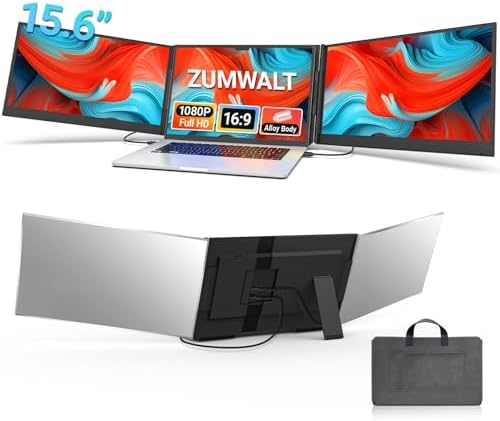
ZUMWALT P7 15.6" Triple Laptop Screen Extender
5.0
2x 15.6" FHD 1080P · ~4 lbs aluminum body · USB-C/HDMI, no driver
Our Best Overall pick: two 15.6" FHD panels on a detachable aluminum-alloy clamp that folds into a travel pouch, covered by both a portable-monitor publication and hands-on video reviews.
A single 15.6" 1080P IPS panel that detaches from its mount and works in four display modes, fitting 13 to 17.3" laptops and running on Windows, Mac, Samsung DeX and Chrome OS at a mid-range price.
JSAUX FlipGo Pro 16" 2.5K Magnetic Screen Extender
4.8
16" 2.5K IPS · magnetic DisplayLink, one cable · built-in hub
Our Best for Triple-Screen Setups pick: dual 2.5K magnetic panels that click onto a laptop lid and run from a single USB-C cable via DisplayLink, with an ABC Mode that adds a third screen, a built-in USB hub and reverse laptop charging.
A 15.6" detachable extender with two adjustable stands for stacked or side-by-side viewing, a 330 cd/m2 IPS panel and VESA mounting, at a steep discount at the time of our scan.
Our Best Affordable pick: a 14" dual-screen extender with a built-in speaker, wide 13-16" laptop compatibility, and one of the broadest independent review footprints in this comparison, all at the lowest price of any product here.
A 14-inch dual-screen extender from ROYY with a one-cable USB-C or HDMI setup, 180-degree rotation and a lighter, thinner build than most clamp-on rivals in this comparison, backed by a device compatibility list that stretches to game consoles.
15.6" FHD 1080P · single Type-C cable · built-in speaker
An aluminum-alloy triple-screen extender that runs both extra panels off a single USB-C cable, with a built-in speaker and full support for Apple M1 through M4 MacBooks alongside Windows and Chrome OS.
Short on time? These three cover most buyers: our Best Overall ZUMWALT P7 15.6-inch triple, the APILDELLA 14-inch dual with a built-in speaker for the most affordable way to add a screen, and the JSAUX FlipGo Pro 16 for a one-cable way into a three-screen setup.
Laptop Screen Extenders 101: What They Do & How to Choose
Understand the category before you buy - what the science actually says, and which specs matter.
Every extender promises a plug-and-play second screen, but whether it works out of the box comes down to one detail most shoppers skip: how it connects. Here is how these panels work, why the cable is the thing that trips people up, and the specs actually worth comparing.
What does a laptop screen extender actually do?
A laptop screen extender is one or more portable displays that mount to the back or sides of your open laptop lid and act as extra desktop space. Instead of a single cramped screen, you get room to keep email on one panel, a document on another, and your main app in the middle.
It clamps or magnetically attaches to your laptop, usually folding out from the sides.
It draws both video and power from your laptop through a cable, most often USB-C.
Your operating system treats each panel as an additional monitor, so windows drag across them like any external display.
Models here range from a single extra 14-inch panel up to triple setups that flank a laptop with two side screens, like the ZUMWALT P7 and the JSAUX FlipGo Pro 16.
The connection is the catch most buyers miss
This is the part worth understanding before you buy anything. These extenders almost always run over a single USB-C cable that carries both the picture and the power. For that to work, your laptop's USB-C port has to support DisplayPort Alt Mode, the standard that lets a USB-C port output video, and it has to supply enough power to drive the panels. Not every USB-C port does. Some are data and charging only, with no video at all.
When a port cannot deliver, you fall back to the second path: HDMI for the video plus a separate cable for power. That is why models like the APILDELLA 14-inch dual and the AOC 14-inch triple list both USB-C and HDMI inputs, and why the single-cable convenience that models like the JSAUX FlipGo Pro promise, driving both extra panels from one Type-C cable, only pays off if your machine supports it.
The catch runs deeper for Apple users. The ZUMWALT P7, this lineup's other triple-screen setup, is not built for Apple M1 to M3 chips at all. Mac owners after a three-screen setup should look to the JSAUX FlipGo Pro 16 in this lineup instead, which uses DisplayLink and an ABC Mode to add a third screen from Apple silicon. Before you buy, confirm your laptop's port supports DP Alt Mode, and if you run a Mac, check that chip line by line.
Which specs actually matter?
Once you know the cable will work, a few features decide which extender fits you:
Connection type: Look for USB-C with DisplayPort Alt Mode for a true single-cable setup. If your port is uncertain, favor a model that also offers HDMI so you have a fallback.
Screen count: Dual adds one panel and stays light; triple flanks your laptop with two for a full command center. More screens mean more weight and more power draw from your laptop.
Size and resolution: Match the panel to your lid so the screens line up in height. These run 14 inches to 16 inches, mostly at 1080P, with the Cevaton stepping up to 16.1-inch 1200P for the sharpest panel in this lineup.
Weight and thickness: This is a travel add-on, so heft matters as much as pixels. Options here span from lightweight travel-focused singles up to about 4 pounds for the aluminum-alloy triple-screen kits, with slim clip-on bodies typically 0.16 to 0.19 inches thick.
Laptop compatibility: Check the fit range. Most clamp onto 13 to 17.3-inch laptops, though the Cevaton is sized for 16-inch screens and one APILDELLA dual targets 13 to 16 inches.
Panel quality: IPS panels and specs like higher nit brightness or wider color-gamut coverage make a real difference for reading and photo work.
How we grade products
Graded Picks rankings are aggregated from several independent signals: verified buyer ratings and the size of the review base for credibility, recent monthly purchase volume for relevance, assessments from trusted tech and productivity publications, and how each product places in leading category lineups. For laptop screen extenders we weigh:
Connection reliability and port compatibility
Panel size, resolution, and image quality
Weight and thickness for travel
Number of screens and mounting stability
Breadth of laptop and operating system support
Ease of setup and driver-free operation
Overall value for the price
Setup note: Before your first trip, test the extender at home and confirm your laptop's USB-C port outputs video and supplies enough power. If a panel stays dark, try the HDMI plus separate power path, update your graphics drivers, and on a Mac verify your chip is supported, since some models mirror or extend only a single panel on Apple silicon.
In-Depth Reviews
Everything we learned from buyer reviews and expert testing, product by product.
ZUMWALT P7 15.6"
Best Overall21% OFF
1. ZUMWALT P7 15.6" Triple Laptop Screen Extender
5.0
Our Best Overall pick. ScreenExtendersHub and TechEBlog have both covered this ZUMWALT P7 extender, alongside independent video walkthroughs, and the picture that emerges is a straightforward, well-reviewed triple-screen kit: two 15.6-inch 1080P IPS panels at 300 nits and 60Hz, clamped to an aluminum-alloy frame that folds and detaches for travel. Setup is plug-and-play over USB-C or HDMI with no driver required on Windows, Android or Chrome OS, and it fits laptops from 12 to 17.3 inches. The combination of genuine triple-screen capacity, a travel-ready folding design and outside review coverage from both a publication and hands-on video testers puts it at the top of this comparison. The clear limitation flagged across reviews is Apple silicon: unlike some rivals here that lose only one side panel on an M-series Mac, this model is not built for M1, M2 or M3 MacBooks at all, so it is best considered a Windows-first pick, Mac owners who specifically want a triple-screen setup should look at the JSAUX FlipGo Pro 16 in this lineup instead, which uses DisplayLink and an ABC Mode to add a third screen from Apple silicon.
This 15.6-inch extender is built around flexibility. The panel detaches from its mount and works in four modes, so it can sit beside a laptop as a dual-screen setup, stand alone as a travel monitor, or serve as a second display for a phone running Samsung DeX, according to the listing. The 1920x1080 IPS screen is larger than the 14-inch panels in this comparison, and it fits laptops from 13 to 17.3 inches on Windows, Mac and Chrome OS with plug-and-play setup. It is a generic-brand product with no professional reviews we could find, so its case rests on the specs, a discount at the time of our scan and consistently positive buyer sentiment rather than outside testing. Detachable designs in this family also tend to be heavier than a simple clamp-on panel, and a single extra screen means it will not build a three-screen layout like the triples here.
Screen size & resolution15.6" FHD 1080P IPS
Screen countDual (one detachable extra panel)
ConnectivityPlug-and-play USB-C/HDMI connection per listing
Weight & thicknessDetachable panel with mount; check listing for exact weight
3. JSAUX FlipGo Pro 16" 2.5K Magnetic Screen Extender
4.8
Our Best for Triple-Screen Setups pick. JSAUX's FlipGo Pro 16 uses two 2.5K (2560x1600) IPS panels rated at 500 nits, 1200:1 contrast and 100% sRGB that attach with N52 magnets rather than clips, run over a single USB-C cable via DisplayLink, and add a built-in USB hub plus reverse laptop charging so the setup needs fewer outlets on the road. An Ultra Mode merges both panels into one continuous display for wide spreadsheets or timelines, while an ABC Mode stitches in a third screen from the same cable for a three-panel workstation, the feature that earns it this lineup's triple-screen pick. It has been reviewed hands-on by Windows Central, CGMagazine, AppleInsider, MacStories, Freaking Nomads and Steam Deck HQ, and the FlipGo line carries an iF Design Award and a Red Dot Design Award. At roughly 6.57 lbs it is heavier and pricier than the clip-on dual and triple panels here, and it relies on DisplayLink rendering rather than a laptop's native GPU output.
This SMISEACOW S13 takes a different mounting approach than the clamp-on panels elsewhere in this comparison: two separate, adjustable stands let the 15.6-inch panel sit stacked above the laptop screen or side-by-side next to it, with 90-degree rotation and portrait, landscape, mirror and extend modes covering more layout options than a simple side-clip panel. The 1920x1080 IPS screen runs at 330 cd/m2 brightness, among the brighter panels in this comparison, at just 0.16 inches thick, and 75x75mm VESA compatibility lets it move to a monitor arm or wall mount if you later set up a permanent desk. It connects over USB-C or HDMI with no driver install, and a deep discount at the time of our scan makes it one of the more accessible ways into a 15.6-inch second screen here. SMISEACOW's broader lineup of extenders has picked up press coverage around its product launches, but this specific S13 model does not yet carry independent, hands-on professional review coverage, so buyers are relying mainly on the spec sheet and buyer feedback rather than lab testing.
5. APILDELLA 14" Dual Screen Extender with Speaker
4.7
Our Best Affordable pick. APILDELLA's 14-inch extender combines more independent write-ups than most other options in this comparison - Lim Team, Electronikz and Happy Life Buy have all published hands-on reviews, alongside several YouTube walkthroughs - with a consistently easy plug-and-play setup that needs no driver installation. This particular version adds a built-in speaker, a feature most rivals skip entirely, and covers laptops from 13 to 16 inches. It is also the lowest-priced product in this comparison, pairing genuine feature depth with the easiest entry price into a second screen. Reviewers note the panel and its mount add noticeable weight to a laptop lid, and that older laptops lacking USB-C DisplayPort or HDMI may need an adapter, but the combination of review coverage, useful extras and price makes it the clear value pick in this lineup.
Screen size & resolution14" FHD 1080P
Screen countDual (single extra panel with built-in speaker)
ConnectivityUSB-C (DisplayPort) or HDMI, no driver required
Weight & thicknessAdds noticeable weight to the laptop lid per reviewers
MountingClamp-on, fits 13-16" laptops
CompatibilityWindows/Mac/Chrome
Warranty1 year replacement warranty
Pros
Built-in speaker is a feature most rivals in this comparison skip
One of the broadest independent review footprints in this comparison
Straightforward plug-and-play setup with no driver install needed
Lowest price of any product in this comparison
Wide 13-16" laptop compatibility for common laptop sizes
Cons
Panel and mount add noticeable weight to the laptop lid
Older laptops without USB-C DisplayPort or HDMI may need an adapter
13-16" laptop range is narrower than the 13-17.3" fit of several rivals
Who is it for?
Budget-focused buyers who want this comparison's lowest price plus useful extras like the built-in speaker and broad review coverage.
Who is it not for?
Owners of larger 17"+ laptops outside its stated fit range, or anyone who specifically wants a triple-screen setup.
ROYY's 14-inch extender adds a single 1080P panel rated at 300 nits and a 1000:1 contrast ratio, running off one USB-C cable or an HDMI-plus-power combo with no driver install. At about 1.3 lbs and 0.19 inches thick, it is lighter and thinner than most of the clamp-on dual and triple panels in this comparison, and ROYY lists compatibility running well beyond laptops to include the Nintendo Switch and PlayStation consoles over HDMI. ScreenExtendersHub's coverage of ROYY's screen-extender lineup credits the brand with confirmed IPS panel specs and above-average color accuracy for the category on sibling models, and buyer feedback on this listing echoes that with consistent praise for easy setup and genuine portability. The tradeoffs buyers flag most often are a display that reads as merely adequate rather than vibrant next to pricier panels, and a full setup that feels bulkier in practice than the thin spec sheet suggests once the stand and cables are accounted for.
A one-cable triple-screen extender for Mac and Windows alike. This APILDELLA 15.6" extender is covered by a dedicated ScreenExtendersHub review as well as 2026 buying-guide roundups, and reviewers consistently point to the same standout feature: both extra panels run off a single USB-C cable, rather than the two-cable-per-panel setups common elsewhere in this comparison. The aerospace-grade aluminum-alloy body is about 4 lbs and 0.16" thick, supports 235-degree rotation and an HDR display mode, and includes a built-in speaker. Unlike our Best Overall pick above, which is not built for Apple silicon at all, this one fully supports Apple M1 through M4 MacBooks in addition to Windows and Chrome OS, making it the triple-screen setup to choose for Mac owners in this comparison.
Screen size & resolution15.6" FHD 1080P, HDR mode
Screen countTriple (single Type-C cable drives both extra panels)
ConnectivityUSB-C (single cable) or HDMI, no driver required
Weight & thickness~4 lbs, 0.16" thick aluminum alloy body
The stars you see are the Graded Picks cumulative score, not a single retailer's average. It blends verified buyer reviews aggregated across major retailers, assessments from professional reviewers and expert testers, and how prominently the product features in leading category lineups.
Advertising Disclosure
Our rankings are compiled by aggregating several independent signals, including verified buyer feedback, how popular a product currently is with shoppers, and evaluations published by professional reviewers. Editorial opinions are our own.
Please note that we participate in affiliate marketing programs. When you purchase through links on our site, we may earn a commission. As an Amazon Associate we earn from qualifying purchases. This comes at no additional cost to you and helps support the resources required to provide valuable content.