A good docking station turns your MacBook Pro into a real desktop with one cable: two monitors, fast storage, wired Ethernet, and a charge that keeps the laptop topped off while you work. But the cheap ones quietly cut corners, capping your displays or leaving the battery to drain even while plugged in. We analyzed thousands of verified buyer reviews, recent sales data, and expert evaluations to find eight docks that expand your setup without the compromises.
Every product we compared, in ranked order. Tap through to Amazon to check today's price, or jump to the full review below.
1
Anker Prime TB5 14-in-1
Best Overall
Anker Prime Thunderbolt 5 Docking Station (14-in-1)
5.0
Thunderbolt 5 · 120Gbps · 140W charging
Our Best Overall pick: a premium 14-in-1 Thunderbolt 5 dock with 120Gbps bandwidth, 140W charging and active cooling, built for the most demanding MacBook Pro and workstation setups.
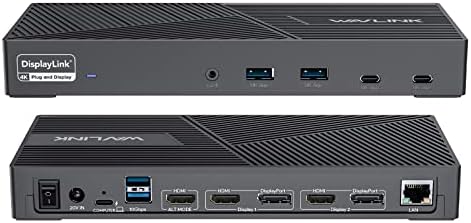
WAVLINK Pro Dual 4K DisplayLink Dock (USB 3.0/USB-C)
4.9
Dual 4K/5K · USB 3.0 · Data & display only
A long-running, widely bought way to add two 4K@60Hz monitors and a full port array over USB 3.0 or USB-C, though it is a data-and-display dock with no laptop charging.
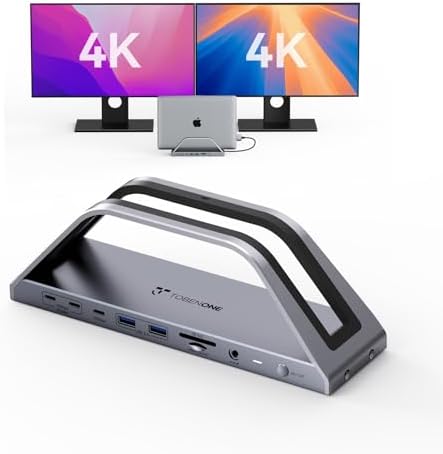
TobenONE MacBook Docking Station Stand (100W, VGA + Dual HDMI)
4.7
13 ports · 100W charging · VGA + Dual HDMI
Our Best Affordable pick: the lowest price in this lineup for a dock that still genuinely charges your MacBook Pro at up to 100W, standing out for a legacy VGA output alongside dual HDMI in a space-saving vertical stand.
WAVLINK Thunderbolt 5 12-in-1 Dock (140W, 120Gbps)
4.7
Thunderbolt 5 · 140W charging · 3 TB5 ports
An Intel-certified Thunderbolt 5 dock that sends up to 140W to your MacBook Pro over a single cable and adds three Thunderbolt 5 ports, four 10Gbps USB-A ports and 2.5G Ethernet, at a lower price than our Best Overall Anker Prime TB5 above.
TobenONE 17-in-2 MacBook Docking Station (150W, Dual 4K)
4.6
17-in-1 · 100W charging · Dual 4K
A budget-friendly 17-port dock with dual 4K@60Hz HDMI output and 100W charging from its included 150W adapter, though base M1/M2 Mac chips are limited to a single external display.
Short on time? These three cover most buyers: our top-graded Best Overall Thunderbolt 5 dock, the Best Affordable pick for a budget two-monitor desk, and the Best for Multi-Display Setups triple-monitor DisplayLink dock for demanding Mac desks.
Best Overall
Anker Prime Thunderbolt 5 Docking Station (14-in-1)
MacBook Pro Docking Stations 101: What They Do & How to Choose
Understand the category before you buy - what the science actually says, and which specs matter.
Every dock lists a wall of ports, but two numbers you rarely see on the box decide whether it fits your MacBook: the speed of the single cable back to the laptop, and how much power the dock pushes back through it. Here is how a dock works, the one thing most shoppers miss, and the specs worth comparing before you buy.
What does a docking station actually do?
A docking station is a hub that connects to your MacBook Pro over one cable and fans that connection out into everything on your desk. Plug in once and you get monitors, keyboard, mouse, drives, wired network, and charging all at the same time, then remove a single plug to take the laptop with you. Everything the dock offers has to travel through that one host connection, which is exactly why that connection matters more than the port count.
The single cable back to your MacBook decides everything
Here is the part most shoppers miss: a dock is only as fast as the one cable linking it to your MacBook, so the host connection is the real spec to read first. A Thunderbolt dock needs a Thunderbolt port on your Mac to reach its full bandwidth and drive multiple high-resolution screens. A USB-C dock is more limited on that same cable.
You can see the gap across this lineup. The Anker Prime Thunderbolt 5 dock connects at up to 120Gbps, the fastest host connection among the docks compared here, with the UGREEN Revodok Max 208's Thunderbolt 4 close behind at 40Gbps. The USB-C docks here run far slower over their host link, from the WAVLINK Pro at around 5Gbps up to 10Gbps on the TobenONE 17-in-2 dock. That single number sets the ceiling for everything downstream.
Power delivery is just as important, because the dock should push back enough wattage to charge your MacBook Pro while it works. A 96W MacBook needs a high-PD dock or it slowly drains even while docked. The range here is wide: the WAVLINK Pro sends no power back to the host at all (it's data and display only), the UGREEN Revodok Max 208 offers a moderate 85W, while the Anker Prime DL7400 and the Anker Prime Thunderbolt 5 dock deliver up to 140W from their own adapters. If your Mac is a power-hungry Pro or Max model, aim high.
One more catch that no dock can fix: Apple silicon MacBook Air and the base MacBook Pro chips cap how many external displays they support, regardless of what the dock advertises. A triple-4K DisplayLink dock like the WAVLINK Triple or the Anker DL7400 can push past those limits using software, but a plain Thunderbolt or USB-C dock cannot conjure a display your chip will not drive. Check your Mac's own display limit before paying for extra monitor outputs.
Which specs actually matter?
Host connection: Thunderbolt (up to 120Gbps on the Anker Prime Thunderbolt 5 dock, 40Gbps on the UGREEN Revodok Max 208) unlocks the most bandwidth and displays among the docks here. USB-C docks top out at 10Gbps, with the WAVLINK Pro around 5Gbps.
Host power delivery: This keeps your laptop charged while docked. It ranges from no power at all on the WAVLINK Pro (data and display only) to 140W on the Anker DL7400 and the Anker Prime Thunderbolt 5 dock; the UGREEN Revodok Max 208 sits in between at 85W.
Display support: Match this to your Mac's real limit. Options run from dual 4K@60Hz on most docks here, to triple 4K@60Hz on the DisplayLink models, up to single or dual 8K@60Hz on the Thunderbolt 5 docks.
Ports and layout: Count what you actually use. HDMI, DisplayPort, USB-A, USB-C, and card readers vary a lot, from the UGREEN's 8 ports to the Anker Prime's 14.
Ethernet speed: Wired jacks here range from Gigabit on the UGREEN and WAVLINK Pro to 2.5G on the Anker DL7400 and the TobenONE 17-in-2.
DisplayLink versus native: DisplayLink docks add monitors through a driver you install, which sidesteps chip display caps but adds software. Native Thunderbolt and USB-C docks are driver-free.
How we grade products
Graded Picks rankings are aggregated from several independent signals: verified buyer ratings and the size of the review base for credibility, recent monthly purchase volume for relevance, assessments from trusted tech publications, and how each product places in leading category lineups. For MacBook Pro docking stations we weigh:
Host connection type and bandwidth
Power delivery back to the laptop
Display support and resolution
Port selection and variety
Ethernet and data speeds
Build quality and cooling
Overall value for the price
Compatibility note: Before you buy, confirm two things about your own MacBook Pro: which host port it has (a Thunderbolt dock wants a Thunderbolt port to hit full speed) and how many external displays its chip supports. A dock can only deliver what your Mac's port and processor allow, so matching it to your specific model matters more than any single feature on the box.
In-Depth Reviews
Everything we learned from buyer reviews and expert testing, product by product.
Anker Prime TB5 14-in-1
Best Overall
1. Anker Prime Thunderbolt 5 Docking Station (14-in-1)
5.0
Anker's Prime Thunderbolt 5 dock earns our Best Overall pick as the future-proofed heavyweight of this lineup, connecting at up to 120Gbps and pushing up to 140W to keep even a 16-inch MacBook Pro charged under load. Its 14 ports span Thunderbolt 5, USB-A, USB-C, a selectable HDMI 2.1 or DisplayPort 2.1 video output, 2.5G Ethernet, an audio combo jack and SD/TF readers, and it supports up to 8K@60Hz on a single display (or dual 8K on compatible Thunderbolt 5 Windows laptops). Expert reviewers describe it as a powerful, premium-feeling dock with active cooling and tasteful LED accents, while consistently flagging its high price as the main reason to think twice. It's overkill for a base-chip Mac that can't take advantage of Thunderbolt 5 bandwidth, but for high-end Pro and Max machines it's the most capable dock in this comparison, backed by a 2-year warranty.
Max display supportSingle 8K@60Hz or dual 8K@60Hz (host-dependent)
Data transfer speed120Gbps (Thunderbolt 5)
Dimensions4.6" x 4.6" x 3.0"
Warranty2 years
Pros
Thunderbolt 5 at up to 120Gbps for the fastest external storage and displays
140W charging keeps a 16-inch MacBook Pro topped up under load
14 ports including HDMI 2.1/DP 2.1, 2.5G Ethernet and card readers
Active cooling and premium build praised by expert reviewers
Backed by a 2-year warranty
Cons
Among the most expensive docks in this comparison
Thunderbolt 5 bandwidth is wasted on base-chip Macs that can't use it
The HDMI and DisplayPort outputs share one slot - you pick one at a time
Who is it for?
Most buyers with a high-end MacBook Pro (Pro/Max) or workstation laptop: our Best Overall pick for the fastest, most future-proof Thunderbolt 5 dock available.
Who is it not for?
Base-chip Mac users or anyone on a budget who won't benefit from Thunderbolt 5's bandwidth or 140W charging - the UGREEN Revodok Max 208 below costs less and still delivers native Thunderbolt speed.
2. WAVLINK Pro Dual 4K DisplayLink Dock (USB 3.0/USB-C)
4.9
WAVLINK's Pro dual 4K dock is a long-running, widely bought universal model that connects over either USB 3.0 or USB-C and drives dual 4K@60Hz displays, or a single 5K@60Hz, using DisplayLink, alongside two HDMI, two DisplayPort, six USB-A ports, Gigabit Ethernet and an audio/mic jack. It has one of the most established buyer track records in this comparison and is a common recommendation for adding a two-monitor setup to an older or entry-level machine on a modest budget. The important caveat, which WAVLINK states plainly, is that this model does not charge the laptop: it is a data-and-display dock, so you will still need your MacBook Pro's own power adapter plugged in separately. USB data tops out at 5Gbps, the slowest in this lineup, and it carries a 1-year warranty.
3. Anker Prime 14-Port Docking Station (160W, Dual 4K)
4.9
Anker's Prime 14-Port pairs broad, consistently positive expert coverage with a rare combination of laptop dock and desktop USB charging station in one unit. Built-in GaN power delivers up to 160W total, enough for 100W to your MacBook Pro plus dedicated charging ports for phones and accessories, while dual HDMI 2.0 outputs drive two 4K@60Hz displays and a 10Gbps upstream link keeps external SSD transfers quick. Reviewers at multiple trusted tech publications call it an excellent choice for organizing a cluttered desk, praising its integrated cable and desktop-charger versatility, though testers note that on base Apple Silicon chips its native, non-DisplayLink video means the second display depends on your Mac's own limits. A 24-month warranty is longer than most budget docks offer.
4. WAVLINK DisplayLink Triple-Monitor Dock (160W, 100W Charging)
4.7
WAVLINK's triple-monitor DisplayLink dock earns our pick for multi-display setups: it uses DisplayLink software to push three simultaneous 4K@60Hz displays - a setup that base Apple Silicon chips can't otherwise reach - while still supplying up to 100W of laptop charging from its 160W power adapter. Connectivity is generous, with three HDMI and two DisplayPort outputs, six 10Gbps USB 3.1 Gen2 ports, Gigabit Ethernet and an audio jack, and it's tuned for the latest MacBook models. Buyers overwhelmingly treat it as a proven, dependable path to a triple-screen Mac workspace, and it has one of the deepest, most established track records of any dock in this lineup. The tradeoffs are inherent to DisplayLink: a required driver install, slightly higher CPU overhead than native video, and a shorter 1-year warranty than the premium Thunderbolt docks.
5. TobenONE MacBook Docking Station Stand (100W, VGA + Dual HDMI)
4.7
Our Best Affordable pick. TobenONE, a connectivity brand founded in 2016, designs this dock as a vertical stand rather than a flat hub, so it holds the MacBook upright to save desk space while its aluminum body helps dissipate heat. It undercuts every other dock in this comparison that still delivers genuine laptop charging, sending up to 100W back to the host over USB-C PD 3.0. Independent coverage of TobenONE's broader dock lineup from outlets like MiniPCReviewer generally describes the brand's docks as well-connected and solidly built for the price, and this model carries that same 13-port design ethos: dual HDMI for a 4K@30Hz external display, plus a VGA output at 1080p@60Hz for connecting to older projectors and monitors that the rest of this comparison's docks lack entirely. Two USB 3.0 ports move data at 5Gbps, two USB 2.0 ports handle low-power peripherals like a mouse or keyboard, and Gigabit Ethernet, an SD/microSD reader and a 3.5mm audio jack round out the connections. It ships with a 2-year warranty, matching the longer warranties in this lineup.
Host connectionUSB-C (dual host ports)
Downstream ports2 HDMI, VGA, 2 USB 3.0, 2 USB 2.0, Gigabit Ethernet, SD/microSD, audio
Host power deliveryUp to 100W (PD 3.0)
Max display supportDual 4K@30Hz (HDMI) or 1080p@60Hz (VGA)
Data transfer speed5Gbps (USB 3.0)
Dimensions9" x 2" x 3" (vertical stand)
Warranty2 years
Pros
Lowest price in this comparison among docks that still genuinely charge your MacBook Pro
Includes a legacy VGA output at 1080p@60Hz, unique in this comparison for connecting older monitors and projectors
Vertical stand design saves desk space and aids heat dissipation
100W USB-C PD 3.0 charging for your MacBook Pro
13 total connections including Gigabit Ethernet and an SD/microSD reader
Cons
HDMI output is capped at 4K@30Hz, slower than the 60Hz most rivals in this comparison offer
USB data tops out at 5Gbps, the slowest tier in this lineup
Newer, smaller brand with a thinner independent-review track record than the established docks here
Who is it for?
Budget buyers who want the lowest price in this comparison for a dock that still genuinely charges a MacBook Pro, plus a space-saving vertical stand and a legacy VGA port.
Who is it not for?
Anyone who wants 60Hz 4K video or faster than 5Gbps data transfer - choose one of the Thunderbolt or native USB-C docks in this comparison instead.
6. WAVLINK Thunderbolt 5 12-in-1 Dock (140W, 120Gbps)
4.7
The WAVLINK UTD58 delivers the newest connection standard at a price that undercuts the premium Anker Prime TB5 above, our Best Overall pick. One 120Gbps Thunderbolt 5 cable carries up to 140W of power, enough for a 16-inch MacBook Pro, plus three downstream Thunderbolt 5 ports, four 10Gbps USB-A ports, an SD 4.0 card slot, 2.5G Ethernet and an audio jack. Cult of Mac praised its charging power and data speeds, and Macworld called it an affordable Thunderbolt 5 dock that looks good and adds handy power options. Reviewers at Windows Central and TechRadar liked the aluminum build and flexible port layout. There is no dedicated HDMI or DisplayPort output, so monitors connect through the Thunderbolt 5 ports with a cable or adapter, and TechRadar and Macworld both note that a Mac is limited to two external displays (base M1 to M3 models to one). It is passively cooled and carries a 1-year warranty.
Host connectionThunderbolt 5 (120Gbps), 1 m cable included
7. UGREEN Revodok Max 208 Thunderbolt 4 Dock (8-in-1)
4.6
UGREEN's Revodok Max 208 is the native-Thunderbolt choice for Mac users, connecting over a single Thunderbolt 4 cable at 40Gbps and adding three downstream Thunderbolt 4 ports that each support display output, 40Gbps data and daisy-chaining. Expert testers across several trusted tech publications praise its compact aluminum build, its three fast USB-A ports and its dependable wired networking, calling it a worthwhile pick for professionals who want maximum speed for external SSDs and monitors. It delivers up to 85W of charging - ample for a 14-inch MacBook Pro - and supports dual 4K@60Hz (or a single 8K on compatible hosts), with macOS subject to Apple's usual external-display limits. Reviewers are clear about what it isn't: with no HDMI, DisplayPort, SD reader or audio jack, it's a fast, focused Thunderbolt hub rather than a full desktop I/O panel, and it carries a reassuring 2-year warranty.
8. TobenONE 17-in-2 MacBook Docking Station (150W, Dual 4K)
4.6
TobenONE's 17-in-2 is priced below every Thunderbolt and premium DisplayLink dock in this comparison while still packing 17 total connections: dual HDMI for driver-free 4K@60Hz output, seven USB-A/USB-C ports reaching 10Gbps, 2.5G Ethernet, a microSD slot and an audio jack. The included 150W power adapter delivers up to 100W back to the host laptop, competitive with far pricier docks here. Independent coverage of TobenONE's broader dock lineup - including reviews of sibling models from MiniPCReviewer and other tech outlets - describes the brand's docks as solid, well-connected value picks, though customer support has drawn mixed feedback. The one compatibility catch worth flagging before buying: base M1 and M2 MacBook Pro chips only support a single external display through this dock, and M3 MacBook Air models need their lid closed to drive both external monitors at once.
Host connectionUSB-C
Downstream ports2 HDMI, 7 USB (USB-C/A, up to 10Gbps), 2.5G Ethernet, audio, microSD
Host power deliveryUp to 100W (150W adapter)
Max display supportDual 4K@60Hz (driver-free)
Data transfer speed10Gbps (USB 3.1 Type-C)
Dimensions9.09" x 3.15" x 2.56"
Warranty2 years
Pros
17 total ports including dual HDMI, microSD and 2.5G Ethernet in one hub
Up to 100W laptop charging from the included 150W adapter
Driver-free dual 4K@60Hz display output
Backed by a 2-year warranty, matching the premium docks in this lineup
Cons
Base M1/M2 MacBook Pro chips are limited to a single external display extension
M3 MacBook Air models need the lid closed to use both external displays
Newer, smaller brand with a thinner independent-review track record than the established docks here
Who is it for?
Buyers who want a high port-count, budget-friendly dual-display dock with strong charging headroom for Pro/Max MacBook Pro chips.
Who is it not for?
Base M1/M2 chip owners who want to use both external displays with the lid open, or anyone who wants a more established brand's track record.
The stars you see are the Graded Picks cumulative score, not a single retailer's average. It blends verified buyer reviews aggregated across major retailers, assessments from professional reviewers and expert testers, and how prominently the product features in leading category lineups.
Advertising Disclosure
Our rankings are compiled by aggregating several independent signals, including verified buyer feedback, how popular a product currently is with shoppers, and evaluations published by professional reviewers. Editorial opinions are our own.
Please note that we participate in affiliate marketing programs. When you purchase through links on our site, we may earn a commission. As an Amazon Associate we earn from qualifying purchases. This comes at no additional cost to you and helps support the resources required to provide valuable content.