If your home has a room where video calls freeze and downloads crawl, a single router is probably the reason. A mesh system spreads several nodes around the house so the signal reaches every corner, but the cheap ones can bog down the moment you add a second node. We analyzed thousands of verified buyer reviews, recent sales data, and expert evaluations to find six mesh systems that fill the dead zones without choking your speed.
A tri-band Wi-Fi 7 mesh system that multiple outlets rank as the best mesh system they tested, pairing genuinely fast 6GHz throughput with a price well below flagship competitors.
Our Best for Large Homes pick: a dual-band Wi-Fi 6 mesh kit built around a quad-core processor for stable performance across many connected devices, with enough three-node coverage to reach the far corners of a big house without paying for Wi-Fi 7 hardware.
Tenda's entry into Wi-Fi 7 mesh brings MLO and a 2.5Gbps port to a dual-band kit, though it has far thinner independent review coverage than the TP-Link Wi-Fi 7 systems in this comparison.
NETGEAR's tri-band Wi-Fi 7 system was named the top pick for most homes after being tested alongside six other Wi-Fi 7 mesh systems, and its 8,000 sq ft rating is the largest advertised coverage in this comparison.
A budget Wi-Fi 7 mesh kit that reviewers repeatedly single out as the best value way into Wi-Fi 7, and one head-to-head test even found it beating the pricier Deco BE63 at 50 feet.
TP-Link's step-up dual-band Wi-Fi 7 kit over the BE23, adding a wider 240MHz channel and AI-Roaming for smoother node hand-offs, at a price still well under the tri-band flagships in this comparison.
Understand the category before you buy - what the science actually says, and which specs matter.
Every mesh system promises whole-home coverage, but the number that decides whether it stays fast is buried in the spec sheet: the backhaul. Here is how mesh works, why backhaul matters more than node count, and the features actually worth comparing.
What does a mesh system actually do?
A single router broadcasts from one spot, so the far side of a larger or multi-floor home ends up with a weak signal or none at all. A mesh system solves that by using two or more units, one main node wired to your modem and the rest placed around the house, that all share the same network name and password.
They blanket the home in one continuous network instead of separate hotspots.
They hand your phone or laptop off from node to node as you move, so you stay connected without switching networks.
They talk to each other constantly, relaying your traffic from a distant node back to the one plugged into your modem.
That last job, node-to-node communication, is where the biggest quality difference hides.
Why backhaul decides whether your mesh stays fast
Backhaul is the private conversation between nodes. Every packet from a far room has to travel back to the main unit, and how that trip happens sets your real-world speed.
On a shared-band system, the nodes use the same 2.4 and 5 GHz bands to talk to each other AND to serve your devices, so both compete for the same lane. Add a node and the traffic doubles up on that lane, which is why these systems can actually slow down as you extend them. The Tenda Nova MX12 uses wireless backhaul only with no MLO, so it leans on this shared approach.
Two fixes reserve a lane just for node-to-node traffic. The first is a wired ethernet backhaul: run a cable between nodes and their conversation leaves the airwaves entirely, which is the fastest and steadiest option. The TP-Link Deco 7 Pro and the Tenda ME3 Pro both support wired backhaul, and the Deco 7 Pro carries 4 ports rated at 2.5 Gbps per node to make that easy. The second is Multi-Link Operation, or MLO, a WiFi 7 feature that lets nodes use several bands at once so backhaul and your devices are less likely to collide. Every WiFi 7 system here supports MLO; the WiFi 6 models do not.
The practical takeaway: match total coverage and node count to your actual square footage rather than buying the most nodes. A 3-pack covering 6,500 to 7,600 sq ft is plenty for most homes, and if you can run one ethernet cable to a distant node, do it.
Which specs actually matter?
Once you understand backhaul, a few features decide which system fits your home:
Backhaul type: This is the speed lever. Wired ethernet is best, MLO on a WiFi 7 system is a strong wireless option, and shared-band wireless like the Nova MX12 and WAVLINK is fine for smaller or single-story homes.
WiFi generation: WiFi 7 (802.11be) on the Deco 7 and Tenda ME3 Pro brings MLO and higher ceilings; WiFi 6 (802.11ax) on the Nova MX12 and WAVLINK covers the basics for less.
Band configuration: The tri-band Deco 7 Pro adds a 6 GHz band (2.4 / 5 / 6 GHz) that the dual-band systems here lack, giving crowded homes more room.
Coverage and node count: Advertised coverage here runs from 6,500 up to 7,600 sq ft in 3-packs. Buy for your square footage, not the biggest number.
Speed rating: Combined ratings span 3 Gbps on the Nova MX12 up to 10 Gbps on the Deco 7 Pro. This is a ceiling most home internet plans will never reach, so weigh it against your actual plan.
Ethernet ports: Faster 2.5 Gbps ports (up to 4 per node on the Deco 7 Pro) matter for wired backhaul and fast wired devices; the Nova MX12 offers only a single Gigabit port.
Device capacity: If you run many smart-home gadgets, the Nova MX12 and Tenda ME3 Pro are rated for 160-plus devices.
How we grade products
Graded Picks rankings are aggregated from several independent signals: verified buyer ratings and the size of the review base for credibility, recent monthly purchase volume for relevance, assessments from trusted networking publications, and how each product places in leading category lineups. For mesh systems we weigh:
Backhaul type and node-to-node performance
WiFi generation and MLO support
Real-world coverage versus advertised square footage
Band configuration and speed rating
Ethernet ports and wired-backhaul flexibility
Device capacity for busy smart homes
Overall value for the price
Setup and placement note: A mesh system only performs as well as its placement. Space the nodes so each one still has a strong signal to the next, roughly one to two rooms apart rather than pushed to the farthest wall, and keep them out in the open instead of inside cabinets. If your home is wired for ethernet, connecting even one node by cable will noticeably steady the whole network.
In-Depth Reviews
Everything we learned from buyer reviews and expert testing, product by product.
TP-Link Deco BE63
Best Overall16% OFF
1. TP-Link Deco 7 Pro BE63 Wi-Fi 7 Mesh System (3-Pack)
5.0
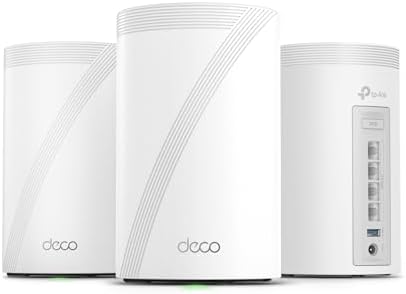
The Deco BE63 earns Best Overall on the strength of unusually broad, consistently positive expert coverage: Tom's Guide, Tom's Hardware, TechRadar and RTINGS all reviewed the tri-band Wi-Fi 7 system, and multiple outlets have named it the best mesh system they tested for the money. Each node uses the 2.4GHz, 5GHz and 6GHz bands together with 320MHz channels and Multi-Link Operation (MLO) to push a combined 10Gbps of theoretical throughput, and reviewers note it holds up well against pricier flagship mesh kits despite selling for hundreds less. Four 2.5 Gbps ports and a USB 3.0 port on every node give it more wired flexibility than most kits in its class, and TP-Link's HomeShield adds free content filtering and basic security on top. The tradeoff for that value is raw top-end speed - it isn't the single fastest Wi-Fi 7 system reviewers tested, just the best blend of speed, features and price.
Wi-Fi standardWi-Fi 7 (802.11be)
Band configurationTri-band (2.4 / 5 / 6 GHz)
Max theoretical speed10 Gbps combined
Coverage (advertised)7,600 sq ft (3-pack)
Ethernet ports per node4x 2.5 Gbps + 1x USB 3.0
BackhaulWired or wireless, MLO supported
SecurityWPA3, HomeShield (VPN, content filtering)
Pros
Named the best mesh system tested by multiple independent outlets
Tri-band Wi-Fi 7 with 6GHz band and MLO keeps performance close to pricier flagships
Four 2.5Gbps ports plus USB 3.0 on every node, more wired flexibility than most mesh kits
Free HomeShield content filtering and VPN support included
Cons
Not the outright fastest Wi-Fi 7 mesh system reviewers tested, just the best value among top performers
Tri-band design costs more upfront than the dual-band kits in this comparison
Advertised 7,600 sq ft coverage assumes open floor plans, not thick-walled or multi-story homes
Who is it for?
Buyers who want near-flagship Wi-Fi 7 performance and expert-verified reliability without paying flagship prices.
Who is it not for?
Small apartments that don't need tri-band capacity, or budget shoppers who can live with dual-band Wi-Fi 7.
The Nova MX12 earns Best for Large Homes honors on the strength of its 7,000 sq ft three-node coverage rating and a 1.7GHz quad-core processor built to sustain throughput and low latency even with more than 160 devices connected - exactly the profile a bigger, device-heavy household needs. Reviewers credit that processor for consistent performance under load, and testers who installed it to fix dead zones reported the whole-home issues were resolved with a straightforward setup that took about 20 minutes. It skips Wi-Fi 7 entirely in favor of a mature, well-supported Wi-Fi 6 platform, a reasonable tradeoff for buyers who want reliable mesh coverage across a large footprint without paying for 6GHz radios or Multi-Link Operation they may not use yet, though it also lacks the multi-gig wired ports found on the pricier Wi-Fi 7 kits here.
Wi-Fi standardWi-Fi 6 (802.11ax)
Band configurationDual-band (2.4 / 5 GHz)
Max theoretical speed3 Gbps combined (AX3000)
Coverage (advertised)7,000 sq ft (3-pack)
Ethernet ports per node1x Gigabit WAN/LAN
BackhaulWireless backhaul only, no MLO
SecurityWPA3
Pros
Quad-core 1.7GHz processor sustains throughput and low latency with many connected devices
Straightforward setup that testers completed in about 20 minutes
Mature Wi-Fi 6 platform is a proven, stable choice for streaming and everyday use
Lower price than every Wi-Fi 7 kit in this comparison
Cons
No Wi-Fi 7 features like MLO or a 6GHz band, so it won't benefit from newer devices
Gigabit-only ports limit wired speeds compared to the 2.5Gbps ports on pricier kits here
Advertised 7,000 sq ft coverage is a best-case, open-floor-plan figure
Who is it for?
Buyers who want dependable whole-home Wi-Fi 6 coverage at a lower price and don't need Wi-Fi 7 features yet.
Who is it not for?
Anyone with new Wi-Fi 7 devices who wants to take advantage of the 6GHz band and MLO.
The ME3 Pro brings Tenda's mesh lineup up to Wi-Fi 7 with Multi-Link Operation, 4K QAM and a dual-band radio design rated for a combined 3.6Gbps, along with one 2.5Gbps port and two Gigabit ports per node for wired backhaul options. It is rated to cover roughly 6,600 sq ft as a three-pack and supports 160-plus connected devices, in line with the other mesh kits here. Compared to the TP-Link Wi-Fi 7 systems in this comparison, though, it has noticeably thinner independent review coverage, so buyers are relying more on brand reputation and specs than on hands-on expert verdicts.
Wi-Fi standardWi-Fi 7 (802.11be)
Band configurationDual-band (2.4 / 5 GHz)
Max theoretical speed3.6 Gbps combined (BE3600)
Coverage (advertised)6,600 sq ft (3-pack)
Ethernet ports per node1x 2.5 Gbps + 2x 1 Gbps
BackhaulWired or wireless, MLO supported
SecurityWPA3, VPN support
Pros
Wi-Fi 7 features (MLO, 4K QAM) at a lower price than the tri-band kits in this comparison
One 2.5Gbps port per node supports a wired backhaul or a fast device connection
Rated to handle 160-plus connected devices without visible slowdown
Supports both wired and wireless backhaul for flexible setup
Cons
Far less independent expert review coverage than the other Wi-Fi 7 systems here
Dual-band only, no 6GHz band for the fastest short-range Wi-Fi 7 speeds
Advertised 6,600 sq ft coverage is a best-case, open-floor-plan figure
Who is it for?
Tenda-brand loyalists or budget-conscious buyers who want Wi-Fi 7 features and are comfortable with lighter third-party review coverage.
Who is it not for?
Buyers who want to lean on extensive hands-on expert testing before choosing a mesh system.
The Orbi 770 (RBE773) impressed testers enough to be named the best Wi-Fi 7 mesh router for most homes after being tested against six other Wi-Fi 7 systems in a two-story house, where it delivered the most reliable speeds, seamless roaming between nodes and zero disconnections during testing. It is a BE11000-class tri-band system combining 6GHz, 5GHz and 2.4GHz radios for a combined theoretical 11Gbps, with 2.5Gbps ports on both the router and satellites for multi-gig wired connections. A three-piece kit is rated to cover up to 8,000 sq ft, the largest claim in this comparison, making it the strongest fit for bigger homes. Reviewers do flag that its Wi-Fi configuration options are more limited than some rivals, which can matter for households with a lot of older legacy devices.
Wi-Fi standardWi-Fi 7 (802.11be)
Band configurationTri-band (2.4 / 5 / 6 GHz), BE11000 class
Max theoretical speed11 Gbps combined
Coverage (advertised)8,000 sq ft (3-pack)
Ethernet ports per node2.5 Gbps ports (4 on router, 2 per satellite)
BackhaulWired or wireless, MLO supported
SecurityWPA3, NETGEAR Armor security
Pros
Rated the best Wi-Fi 7 mesh system for most homes after head-to-head testing against six competitors
Delivered zero disconnections and seamless node roaming in independent testing
Largest advertised coverage rating in this comparison at 8,000 sq ft
2.5Gbps ports on both router and satellites for multi-gig wired connections
Cons
Highest price in this comparison by a wide margin
More limited Wi-Fi configuration options than some rival systems, which can matter with older legacy devices
Advertised 8,000 sq ft coverage assumes open floor plans, not dense or multi-story construction
Who is it for?
Buyers with large or multi-story homes who want the most independently validated reliability in this comparison.
Who is it not for?
Smaller households or anyone on a budget - the lower-priced Wi-Fi 7 kits here cover most homes adequately for far less.
5. TP-Link Deco 7 BE23 Wi-Fi 7 Mesh System (3-Pack)
4.7
The Deco BE23 is TP-Link's entry point into Wi-Fi 7 mesh, and it has become a favorite among reviewers looking for the best budget option in the category: Tom's Guide called it a game changer for whole-home connectivity, and TechGearLab put it through full hands-on testing. It delivers Multi-Link Operation (MLO) and two 2.5Gbps ports per node, both rare at this price tier, letting buyers run a wired backhaul or connect a multi-gig modem. In throughput testing, Tom's Hardware recorded stronger 50-foot performance from the BE23 than from TP-Link's own pricier tri-band BE63, a notable result for a dual-band budget kit. Reviewers do note that signal strength drops off if you stray more than about 30 feet from a node, so larger or oddly shaped homes may need an extra unit.
Wi-Fi standardWi-Fi 7 (802.11be)
Band configurationDual-band (2.4 / 5 GHz)
Max theoretical speed3.6 Gbps combined (BE3600)
Coverage (advertised)6,500 sq ft (3-pack)
Ethernet ports per node2x 2.5 Gbps
BackhaulWired or wireless, MLO supported
SecurityWPA3-Personal, HomeShield
Pros
Repeatedly named the best budget way into Wi-Fi 7 by independent reviewers
Two 2.5Gbps ports per node, rare at this price tier, for wired backhaul or a multi-gig modem
Outperformed TP-Link's own pricier tri-band BE63 in one 50-foot throughput test
Multi-Link Operation (MLO) support despite the entry-level price
Cons
Dual-band only, no 6GHz radio for the fastest short-range Wi-Fi 7 speeds
Signal strength drops off noticeably beyond about 30 feet from a node
Lower advertised coverage than the tri-band kits in this comparison
Who is it for?
Buyers who want genuine Wi-Fi 7 features at the lowest price in this comparison and have a reasonably compact home.
Who is it not for?
Larger homes needing maximum range per node, or anyone who wants the extra headroom of a 6GHz band.
6. TP-Link Deco 7 BE25 Wi-Fi 7 Mesh System (3-Pack)
4.6
The Deco BE25 slots between TP-Link's entry-level BE23 and its tri-band BE63 flagship, and reviewers including Dong Knows Tech and RTINGS have tested it as an affordable way into genuine Wi-Fi 7 hardware. Its dual-band radios push a combined 5Gbps, using a wider 240MHz channel on the 5GHz band that gives roughly 50% more bandwidth than the BE23's 160MHz setup, and every node carries two 2.5Gbps ports for a wired backhaul or a fast device connection. The standout software feature is AI-Roaming, which predicts when a device's signal is about to degrade and hands it to the next node proactively rather than waiting for the connection to drop, and a three-node kit is rated for 6,600 sq ft and 150-plus devices with TP-Link's free HomeShield security layered on top. Reviewers are clear about the tradeoff: without a 6GHz radio, wireless backhaul has less headroom under heavy load than the tri-band kits here, so wiring at least one node is recommended for the best results.
The stars you see are the Graded Picks cumulative score, not a single retailer's average. It blends verified buyer reviews aggregated across major retailers, assessments from professional reviewers and expert testers, and how prominently the product features in leading category lineups.
Advertising Disclosure
Our rankings are compiled by aggregating several independent signals, including verified buyer feedback, how popular a product currently is with shoppers, and evaluations published by professional reviewers. Editorial opinions are our own.
Please note that we participate in affiliate marketing programs. When you purchase through links on our site, we may earn a commission. As an Amazon Associate we earn from qualifying purchases. This comes at no additional cost to you and helps support the resources required to provide valuable content.