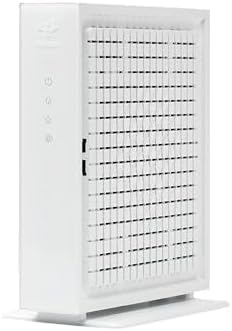
Your internet provider will happily rent you a modem for a monthly fee, and that fee never stops. Buying your own does the same job, usually better, and it pays for itself faster than most people expect. But the box only works if its DOCSIS version and rated speed match your plan, and if your provider approves the model. We analyzed thousands of verified buyer reviews, recent sales data, and expert evaluations to find six devices that cover the modems and the routers you pair them with.
Every product we compared, in ranked order. Tap through to Amazon to check today's price, or jump to the full review below.
1
Hitron CODA56
Best Overall
Hitron CODA56 DOCSIS 3.1 Cable Modem
5.0
DOCSIS 3.1 · 2.5 Gbps port · modem only, no WiFi
Our Best Overall pick: a DOCSIS 3.1 cable modem with 32x8 channel bonding and a 2.5 Gbps Ethernet port that Tom's Guide named the best cable modem on a budget, with no WiFi or router built in by design.
WiFi 6E AXE5400 · tri-band w/ 6 GHz · router only, no modem
Our Best Affordable pick: a WiFi 6E router, not a modem, so pair it with a modem to get online. A 2025 PCMag Editors' Choice with a dedicated 6 GHz band, 5.4 Gbps of combined bandwidth and a 2.5G WAN port, at the lowest price of any product in this comparison.
A WiFi 7 router, not a modem, so you will need your own cable, fiber or DSL modem to pair with it. Genuine WiFi 7 with 6.5 Gbps of combined bandwidth, dual 2.5G ports and VPN support that testers found rivals TP-Link's pricier flagships.
The only true all-in-one here: a DOCSIS 3.1 cable modem and AX2700 WiFi 6 router in one box, for cable subscribers who want a single device instead of pairing a separate modem and router.
Our Best Standalone Modem pick: mid/high-split DOCSIS 3.1 with 32x8 channel bonding and a 2.5 Gbps port, built for the newest cable plans reaching 2.5 Gbps down and 1 Gbps up, with no WiFi at all.
The newest addition to this comparison: a compact, no-WiFi DOCSIS 3.1 cable modem with 32x8 channel bonding, a 2.5 Gbps port paired with a 1 Gbps port, and a Dong Knows Tech review calling it a solid cable modem for plans up to 2.5 Gbps.
These three cover most buyers: our top-graded Hitron CODA56 modem overall, the TP-Link Archer AXE75 router for the lowest price here, and the NETGEAR CM3000 for the newest, fastest cable plans.
Understand the category before you buy - what the science actually says, and which specs matter.
Every modem promises to connect your home, but the version it supports and the speed it is rated for decide whether it keeps up with your plan or quietly throttles it. Here is how a modem works, why buying beats renting once you look at the math, and the specs actually worth comparing.
What does a cable modem actually do?
A cable modem is the translator between the coaxial line coming into your home and the network inside it. The signal arrives as a cable-TV-style frequency, and the modem converts it into the internet data your devices understand. That is the whole job, and a modem by itself creates no WiFi at all.
It brings the internet signal into your home over the coax line.
It converts that signal into standard Ethernet data.
It hands that data off through one or more Ethernet ports.
For WiFi you need a separate router, or a combo unit that packs both a modem and a router into one box. In this lineup, the Hitron CODA56 and the NETGEAR Nighthawk CM3000 are modems only, so each needs a router beside it, while the NETGEAR Nighthawk CAX30 packs a modem and router into one box. The TP-Link Archer models here, the BE6500 and the AXE5400, are the routers that create the WiFi once a modem feeds them the signal.
Why buying your own modem beats renting one
This is the part most shoppers never run the numbers on. Providers like Xfinity, Spectrum, and Cox typically fold a modem rental charge into your bill every month, and that charge outlives the equipment. A modem you buy once is yours, and after about a year of use the purchase has usually covered its own cost against what you would have paid in rental fees. After that, it keeps saving you money for as long as you own it.
The catch is that the savings only show up if the modem fits your plan. Two specs decide that. First, match the DOCSIS version: DOCSIS 3.1 is what you want for gigabit and future plans, while the older DOCSIS 3.0 standard is fine only for slower tiers. Every modem in this lineup, the CODA56, the CM3000 and the CAX30, is DOCSIS 3.1. Second, match the rated speed to the plan you pay for. The CAX30's built-in modem is rated up to about 2 Gbps, while the CODA56 and CM3000 reach up to 2.5 Gbps, so there is no point paying for a 2.5 Gbps modem on a plan that tops out far below it. Then confirm your provider approves the exact model, because an unapproved modem will not activate no matter how capable it is.
Which specs actually matter?
A few features decide which one fits you:
DOCSIS version: This is the compatibility lever. Choose DOCSIS 3.1 for gigabit and future-proofing; DOCSIS 3.0 suits only slower plans. Every modem here is 3.1.
Rated plan speed: Match the modem's ceiling to what you pay for. The CAX30 is rated up to about 2 Gbps, the CODA56 and CM3000 up to 2.5 Gbps.
Channel bonding: More bonded channels means more capacity. The CODA56 and CM3000 both run 32x8 channel bonding, and the CM3000 adds mid/high-split support for faster upload on plans that offer it.
Ports: Check the Ethernet speed. The CAX30 has four Gigabit LAN ports on its router side, the CODA56 has a single 2.5 Gbps port, and the CM3000 pairs a 2.5G LAN with two 1G LAN ports.
Provider compatibility: Confirm approval before buying. The CODA56, CM3000 and CAX30 all list Xfinity, Spectrum, Cox, and most cable providers, though the CM3000 is not for Xfinity Voice, and none work on fiber or DSL.
Modem-only vs combo: Decide whether you want a separate router for flexibility or a combo box for simplicity. The CODA56 and CM3000 are modem-only, the CAX30 packs both into one box, and the router-only devices here, the TP-Link BE6500 and TP-Link AXE5400, are WiFi-only, so pair one of them with a modem of your choice.
How we grade products
Graded Picks rankings are aggregated from several independent signals: verified buyer ratings and the size of the review base for credibility, recent monthly purchase volume for relevance, assessments from trusted networking publications, and how each product places in leading category lineups. For modems we weigh:
DOCSIS version and channel bonding
Rated speed against common plan tiers
Port speed and link aggregation
Provider approval and compatibility breadth
Whether it is modem-only or a combo unit
Reliability and heat management over time
Overall value against ongoing rental fees
Compatibility note: Before you buy, check your provider's approved-device list for the exact model and confirm it matches your plan speed, because a modem that is not on the list will not activate. Cable modems work on cable service only, not fiber or DSL, and if you want WiFi remember that a modem needs a router beside it or a combo unit to create the network.
In-Depth Reviews
Everything we learned from buyer reviews and expert testing, product by product.
Hitron CODA56
Best Overall
1. Hitron CODA56 DOCSIS 3.1 Cable Modem
5.0
The CODA56 is our Best Overall pick: a genuine cable modem with no WiFi and no router functions, and Tom's Guide named it the best cable modem on a budget. DOCSIS 3.1 with 32x8 channel bonding and 2x2 OFDM channels supports cable plans up to 2.5 Gbps, and reviewers measured near-2.5-Gbps real-world throughput through its single 2.5 Gbps Ethernet port when paired with a capable router. It is certified for Xfinity, Spectrum, Cox, Cable One and several smaller cable ISPs, and Hitron rates it for low power draw versus older DOCSIS 3.1 modems. The trade-off is exactly what you would expect from a modem-only device: you supply your own WiFi router, and like every cable modem it is incompatible with fiber, DSL or satellite internet. Pair it with any router in this comparison and you have a complete, provider-rental-free setup at a genuinely budget price.
Device typeCable modem only (no WiFi/router)
StandardDOCSIS 3.1, 32x8 channel bonding
Rated speedUp to 2.5 Gbps (with a compatible plan & router)
Our Best Affordable pick. The Archer AXE75 is a WiFi router, not a modem, so it needs to plug into a separate modem to get online. Judged as a router, it is a 2025 PCMag Editors' Choice with reviews from PC Gamer, RTINGS and Dong Knows Tech behind it, and it undercuts every other product in this comparison on price. It is also the only path in this comparison to a dedicated 6 GHz band, uncongested, near-interference-free spectrum that PC Gamer found delivers particularly fast connections up close, making it their budget gaming recommendation. A 1.7 GHz quad-core CPU, six beamforming antennas, a 2.5G WAN port, USB 3.0, OneMesh support and TP-Link's VPN and HomeShield features round out the spec sheet. Know the physics before buying: 6 GHz excels in the same room but fades through walls, and TP-Link rates overall coverage at a modest 2,000 sq ft.
Device typeWiFi router only (no modem - pair with your own)
Our Best Affordable pick: the lowest price of any product in this comparison
A 2025 PCMag Editors' Choice with broad expert coverage from PC Gamer, RTINGS and Dong Knows Tech
PC Gamer's budget gaming pick - very fast 5 GHz and 6 GHz up close
Six beamforming antennas plus a 2.5G WAN port
OneMesh support plus USB 3.0 file sharing
Cons
This is a router, not a modem - you'll need a separate modem to get online
6 GHz range is short and drops through walls
WiFi 6E only, so no WiFi 7 MLO or 320 MHz channels
Who is it for?
Our Best Affordable pick for gamers and streamers who already have (or plan to add) a separate modem and want a clean 6 GHz band for same-room speed and low latency.
Who is it not for?
Anyone who wants a single box that gets them online out of the box - the modem-only units here (Hitron, NETGEAR CM3000) have no WiFi built in, so pair this with one of them, or consider the NETGEAR CAX30 combo elsewhere in this comparison if you'd rather have modem and router in one box.
Like half of this lineup, the Archer BE400 is a WiFi router with no modem built in, so you will need your own cable, fiber or DSL modem to pair it with. Judged as a router, it delivers genuine WiFi 7 at a mid-range price. Reviewers measured fast, stable 5 GHz throughput comparable to TP-Link's much more expensive Archer BE800, driven by multi-link operation, 4K-QAM, six streams and a quad-core CPU. You get a 2.5G WAN plus a 2.5G LAN port, USB 3.0 file sharing, EasyMesh expandability, and strong VPN support with WireGuard plus native NordVPN and Surfshark modes. The Tether app earns consistent praise for its clean interface, per-device parental controls and speed limits. Two honest caveats from testing: TP-Link itself recommends keeping multi-link operation disabled on this model due to conflicts with some Intel BE200 laptop adapters, and its 2.4 GHz band was the slowest at long range among TP-Link routers tested.
Device typeWiFi router only (no modem - pair with your own)
StandardWiFi 7 (802.11be), dual-band
Rated speedBE6500 (up to 6.5 Gbps combined)
Ports1x 2.5G WAN, 1x 2.5G LAN, 3x 1G LAN, USB 3.0
Coverage / compatibilityUp to 2,400 sq ft / 90 devices
5 GHz speeds testers compare to flagships costing far more
Dual 2.5G ports (WAN + LAN) plus USB 3.0
Excellent Tether app with per-device parental controls
Strong VPN support: WireGuard, NordVPN, Surfshark
Genuine WiFi 7 features at a mid-range price
Cons
This is a router, not a modem - you'll need a separate modem to get online
TP-Link advises disabling multi-link operation due to Intel BE200 adapter conflicts
2.4 GHz band is comparatively weak at long range
Who is it for?
Households that already have a modem and want WiFi 7 speed and full-featured app controls.
Who is it not for?
Anyone who wants a single box that includes the modem - the standalone modems in this comparison have no WiFi built in, so pair this with the Hitron or NETGEAR CM3000 modem elsewhere in this comparison, or consider the NETGEAR CAX30 combo instead.
The CAX30 is the only product in this comparison that replaces two boxes at once: its DOCSIS 3.1 cable modem handles plans pushing toward 2 Gbps on Xfinity, Spectrum, Cox and other cable ISPs, while the AX2700 WiFi 6 router side covers about 2,000 sq ft and 25 devices. The money math is the headline - dropping a monthly ISP equipment rental fee means the CAX30 can pay for itself within a couple of years, and everything after that is savings. Buyers consistently praise the 10-15 minute app-guided setup and day-to-day reliability. The compromises: the Nighthawk app is easy but shallow on advanced controls, four gigabit LAN ports fill up fast in wired-heavy homes, and it is emphatically cable-only - no fiber, DSL or bundled voice plans.
Device typeDOCSIS 3.1 modem + WiFi 6 router combo
StandardDOCSIS 3.1 modem + WiFi 6 (802.11ax)
Rated speedAX2700 WiFi + cable plans up to ~2 Gbps
Ports4x 1G LAN, USB 3.0, coax (cable input)
Coverage / compatibilityXfinity, Spectrum, Cox; up to 2,000 sq ft / 25 devices
Modem + router in one box - no separate device to buy or rent
DOCSIS 3.1 headroom for cable plans approaching 2 Gbps
10-15 minute guided setup via the Nighthawk app
Works with Xfinity, Spectrum, Cox and most major cable ISPs
Cons
Cable-only: incompatible with fiber, DSL and voice-bundled plans
Nighthawk app lacks advanced traffic and network controls
WiFi 6 (not 6E or 7) and only gigabit LAN ports
Who is it for?
Cable-internet households who want one box that's both the modem and the router, without paying a monthly ISP equipment rental fee.
Who is it not for?
Fiber and DSL subscribers (it won't work at all), and anyone who wants to upgrade router and modem on separate schedules - a standalone modem plus router is more flexible.
Our Best Standalone Modem pick. The CM3000 is a genuine cable modem with zero WiFi built in, designed purely to pair with a separate router. Its mid/high-split DOCSIS 3.1 architecture and 32x8 channel bonding target the newest, fastest cable tiers: up to 2.5 Gbps down and 1 Gbps up, delivered through one 2.5 Gbps Ethernet port plus two standard gigabit ports for directly wired devices. Owner feedback consistently describes it as a set-it-and-forget-it modem that handles heavy multi-device households, streaming, gaming and work-from-home traffic at once, without slowdowns, and setup is described as straightforward. It is certified for Xfinity, Spectrum and Cox, though it does not support Xfinity Voice plans. The trade-off: it costs more than basic modems, and you are on the hook for pairing it with a router of your choice. Any of the WiFi routers in this comparison would work.
The Surfboard S33 is the newest product in this comparison: a standalone DOCSIS 3.1 cable modem from ARRIS, built by Vantiva, the same manufacturer behind the SB8200 elsewhere in this comparison, with no WiFi or router functions built in. Its 32x8 channel bonding plus four OFDM channels supports cable plans up to 2.5 Gbps, delivered through a 2.5 Gbps Ethernet port alongside a second, independent 1 Gbps port; the two ports do not link-aggregate into a combined connection, so only one port at a time carries your top plan speed. Dong Knows Tech called it a solid cable modem in testing, and reviewers at Homeowner.com and ModemGuides.com highlight its compact, rounded-corner chassis, one of the smallest Multi-Gig modems on the market. It's certified for Xfinity, Spectrum, Cox and most other major cable ISPs, and ARRIS backs it with a 2-year warranty. As the newest entrant here it carries a shorter track record than the established modems in this lineup, but its spec sheet and early expert reception put it in the same class as the Hitron and NETGEAR modems it competes with.
Security & featuresCompact chassis; requires a separate WiFi router
Warranty2 years
Pros
DOCSIS 3.1 with 32x8 channel bonding plus 4 OFDM channels supports cable plans up to 2.5 Gbps
Dong Knows Tech calls it a solid cable modem for multi-gig cable plans
Compact, rounded-corner design - one of the smallest Multi-Gig modems available
Certified for Xfinity, Spectrum, Cox and most major cable ISPs
2-year warranty
Cons
No WiFi or router built in - you must add your own router
The 2.5 Gbps and 1 Gbps ports don't link-aggregate, so only one port at a time matches your plan speed
Newest entrant in this comparison, so it carries a shorter track record than the established modems here
Who is it for?
Cable subscribers who want the newest standalone DOCSIS 3.1 modem in a compact design and already have (or plan to add) their own WiFi router.
Who is it not for?
Anyone who wants the longest proven track record - the Hitron CODA56 or NETGEAR CM3000 elsewhere in this comparison carry a longer history of expert and owner testing.
The stars you see are the Graded Picks cumulative score, not a single retailer's average. It blends verified buyer reviews aggregated across major retailers, assessments from professional reviewers and expert testers, and how prominently the product features in leading category lineups.
Advertising Disclosure
Our rankings are compiled by aggregating several independent signals, including verified buyer feedback, how popular a product currently is with shoppers, and evaluations published by professional reviewers. Editorial opinions are our own.
Please note that we participate in affiliate marketing programs. When you purchase through links on our site, we may earn a commission. As an Amazon Associate we earn from qualifying purchases. This comes at no additional cost to you and helps support the resources required to provide valuable content.