If you have ever peeled a jammed inkjet label off a package or watched a color cartridge run dry mid-shipment, a thermal printer feels like a small miracle. It prints crisp shipping labels and receipts in seconds with no ink at all, though the cheap ones can hide fussy app setup and labels that fade faster than you would expect. We analyzed thousands of verified buyer reviews, recent sales data, and expert evaluations to find seven thermal printers that pump out clean labels and pair with your phone without a fight.
Every product we compared, in ranked order. Tap through to Amazon to check today's price, or jump to the full review below.
1
Phomemo 241BT
Best Overall Black Friday Deal34% OFF
Phomemo 241BT Bluetooth Thermal Label Printer (4x6, Pink)
5.0
203 DPI · 4x6 labels · Bluetooth & USB-C
Phomemo's flagship shipping printer pairs Bluetooth and USB-C connectivity with a built-in OLED status display, and independent buying guides specifically recommend it for wireless Bluetooth printing among 4x6 label printers.
Best for High-Volume Shipping Black Friday Deal31% OFF
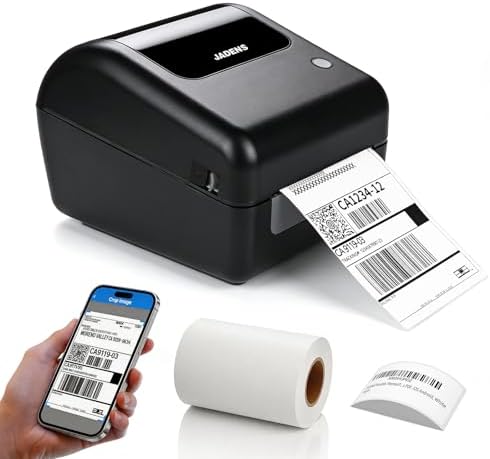
JADENS JD268BT Bluetooth Thermal Shipping Label Printer
4.9
203 DPI · 4x6 + circle labels · 30-day guarantee
Independent buying guides call out the JADENS Bluetooth model as the best balance of price and features among 4x6 printers, with a hands-on reviewer describing setup as easier than making coffee.
Nelko PL70e-BT Bluetooth Thermal Shipping Label Printer
4.8
203 DPI · 4x6 labels · Lifetime tech support
A budget-focused Bluetooth shipping printer that an independent seller-tools reviewer called unusually capable for its price, backed by auto paper detection and free lifetime technical support.
This entry in the pocket letter/A4 category adds a higher 300 DPI resolution and support for five different paper widths, powered by a 2600mAh battery rated for about 160 pages per charge.
JADENS 168BT Bluetooth Thermal Shipping Label Printer with Built-in Bin
4.7
203 DPI · 4x6 labels · Built-in 350-label bin
The JADENS 168BT pairs Bluetooth and USB connectivity with a built-in label bin that holds up to 350 labels, keeping the roll enclosed and dust-free. It is built to work with USPS, UPS, Amazon, Etsy and Shopify label formats across iOS, Android, Windows and Mac.
Omezizy D450BT Bluetooth Shipping Label Printer (Built-in Bin)
4.7
203 DPI · 4x6 labels · 250-label built-in bin
An Omezizy shipping printer built around a 250-label built-in paper bin, the largest enclosed label capacity in this comparison, so a fresh roll keeps feeding through long runs without babysitting the spool. Posh Seven Magazine's dedicated Omezizy roundup named the D450BT its top pick for most small business owners.
A senior TechRadar printer editor called the RW403B the best shipping label printer they'd ever tested, citing reliable, quiet printing and a self-calibrating design that all but eliminates alignment errors.
Short on time? These three cover most buyers - our top-graded choice, the proven pick for high-volume shipping, and the most affordable option in this comparison.
Best Overall
Phomemo 241BT Label Printer
Phomemo 241BT Bluetooth Thermal Label Printer (4x6, Pink)
Thermal Printers 101: How They Work & How to Choose
Understand the category before you buy - what the science actually says, and which specs matter.
Every thermal printer promises fast, inkless printing, but the resolution, the label widths they accept, and the apps they talk to vary more than the marketing lets on. Here is how the technology works, the one honest trade-off behind that no-ink promise, and the features actually worth comparing before you buy.
What does a thermal printer actually do?
A direct thermal printer prints by heating tiny dots on special heat-sensitive paper, so the image forms right on the label with no ink, toner, or ribbon involved. You send it a shipping label, a barcode, or a receipt from your phone or computer, and it darkens the paper wherever heat is applied. In plain terms:
Turns a label file from Amazon, Shopify, Etsy, USPS, or your own app into a printed 4x6 or receipt-width output
Feeds and cuts to the next label automatically on printers with label detection
Connects wirelessly over Bluetooth, or by cable over USB-C, so you can print from a desk or a phone
The catch with direct thermal: no ink, but the print fades
Here is the thing most first-time buyers miss. Every printer in this lineup is direct thermal, which means it prints with heat and never needs ink, toner, or ribbon cartridges. That is a real, ongoing saving, and it is why these machines are so popular with small shippers. The trade-off is physical: because the image lives in heat-sensitive paper, thermal labels fade over time and will darken or turn gray if they sit in sunlight, a hot car, or near anything warm. For a shipping label that gets scanned and delivered within days, that is a non-issue, and for sticker organizing and receipts kept indoors it is fine too. Where direct thermal falls short is permanent or outdoor use, like a label that has to survive months of weather, in which case you should laminate or cover it. For everyday shipping and labeling, which is exactly what models like the Phomemo 241BT, MUNBYN RW403B, and Nelko are built for, the fade simply does not matter.
Which specs actually matter?
Once you understand the heat-and-fade basics, a few features decide which printer fits you:
Print resolution: This is what keeps barcodes scannable and small text crisp. Every printer in this comparison prints at 203 DPI, which is plenty for 4x6 shipping labels and standard barcodes.
Label and paper width: This sets what you can actually print. The dedicated label models top out at 4 inches wide (the MUNBYN accepts print widths from 1.57 to 4.25 inches, the Nelko PL70e-BT from 1.54 to 4.1 inches), while the JADENS Paper Bin and Omezizy D450BT add smaller specialty label sizes and the Nelko PM230 prints 54mm sticker rolls instead of 4x6 labels.
Print speed: For shipping in batches, speed matters. The label printers here run from about 66 labels per minute on the Phomemo 241BT up to 72 labels per minute on the MUNBYN, JADENS, Nelko PL70e-BT, and Omezizy models.
Connectivity: Bluetooth lets you print straight from a phone, while USB-C gives a reliable wired link to a computer. Most models here offer both; the JADENS and the Nelko PM230 sticker printer are Bluetooth only.
App and marketplace compatibility: This is the practical thing to check. Confirm the printer works with your platforms, whether that is USPS, Amazon, Shopify, Etsy, iOS, Android, Windows, Mac, or Chromebook, since a printer that will not talk to your label source is just a paperweight.
Label roll cost and compatibility: Since the rolls are your only recurring expense, check what sizes each printer accepts. Some, like the JADENS, take 3x3, 3x2, 2x1, and circle labels beyond the standard 4x6.
Built-in label storage: The JADENS Paper Bin and the Omezizy D450BT tuck the label roll into an enclosed bin rather than leaving it exposed on an open spool, with the Omezizy's 250-label capacity the largest in this comparison for buyers who print in long, unattended batches.
How we grade products
Graded Picks rankings are aggregated from several independent signals: verified buyer ratings and the size of the review base for credibility, recent monthly purchase volume for relevance, assessments from trusted small-business and tech publications, and how each product places in leading category lineups. For thermal printers we weigh:
Print resolution and barcode clarity
Label and paper width range
Print speed for batch work
Connectivity and setup reliability
App and marketplace compatibility
Label roll cost and size options
Overall value for the price
Longevity note: Because direct thermal labels are heat-sensitive, store your label rolls in a cool, dark drawer and keep printed labels out of direct sunlight and hot spaces until they ship. If you need a label to last for months or survive outdoors, cover it with clear tape or a laminate pouch, since the print will gradually fade or darken on its own.
In-Depth Reviews
Everything we learned from buyer reviews and expert testing, product by product.
Phomemo 241BT
Best Overall Black Friday Deal34% OFF
1. Phomemo 241BT Bluetooth Thermal Label Printer (4x6, Pink)
5.0
The 241BT is Phomemo's flagship shipping label printer, and independent buying guides specifically recommend it for wireless Bluetooth printing among 4x6 thermal label printers. It connects over Bluetooth or USB-C to iOS, Android, Mac, Windows, Chrome OS and Linux, and its OLED display shows connection and paper status without opening an app. Phomemo's companion app lets you type labels directly with font choices, add barcodes, and pull in templates rather than uploading a document every time. Like every dedicated label printer in this comparison, it's a direct-thermal design, so there's no ink or toner to buy or replace. A deep markdown at the time of our scan makes the flagship model considerably cheaper than its list price. The main tradeoff owners flag across Phomemo's lineup is an occasional need to update the companion app, and the printer only supports monochrome output, which is standard for the category but worth knowing going in.
ConnectivityBluetooth, USB-C
Print resolution203 x 203 DPI
Max print/label size4" x 6"
Print speedUp to 66 labels/min
In the boxPrinter, power adapter & cord, USB-C cable, user guide, starter labels
Compatible platformsiOS, Android, Mac, Windows, Chrome OS, Linux
Warranty1 year manufacturer warranty
Pros
Singled out by independent buying guides for wireless Bluetooth printing
OLED display shows connection and paper status at a glance
Works across iOS, Android, Mac, Windows, Chrome OS and Linux
No ink or toner - direct thermal printing
Deep markdown at time of scan brings the price well below list
Cons
Companion app occasionally needs updates and can feel less polished than dedicated shipping software
Monochrome printing only, standard for the category but worth knowing
Limited to 4x6 shipping labels - no general-purpose or letter-size printing
Who is it for?
Small business shippers who want a well-reviewed, feature-complete Bluetooth printer with an at-a-glance status display.
Who is it not for?
Anyone who needs to print full-page letter or A4 documents rather than 4x6 shipping labels - none of the dedicated label printers in this comparison, including this one, are built for that.
Best for High-Volume Shipping Black Friday Deal31% OFF
2. JADENS JD268BT Bluetooth Thermal Shipping Label Printer
4.9
Independent thermal-printer roundups specifically recommend the JADENS Bluetooth model for buyers who want the best balance of features and value in this category. A hands-on reviewer described setup as easier than making coffee, with crisp prints and no jamming during testing. It connects over Bluetooth to Windows, Android, iOS and macOS, prints a range of label shapes and sizes beyond the standard 4x6, including circular labels, and needs no ink or toner. JADENS backs the printer with a one-year hardware warranty plus a 30-day money-back window, and a solid markdown was active at the time of our scan. The main complaint that surfaces across owner feedback is inconsistent customer-service responsiveness when something does go wrong, though the hardware itself draws few complaints.
ConnectivityBluetooth
Print resolution203 x 203 DPI
Max print/label size4" x 6" (plus 3x3, 3x2, 2x1, circle labels)
Print speedUp to 72 labels/min
In the boxPrinter, power cord, 50 test labels, USB cable, user manual
Compatible platformsAndroid, iOS, Windows, Mac
Warranty1 year hardware warranty + 30-day money-back guarantee
Pros
Specifically recommended in independent buying guides as the best price-to-feature balance in the category
Hands-on reviewer reported crisp prints and jam-free setup
Prints circular and multiple non-standard label sizes beyond 4x6
One-year hardware warranty plus a 30-day money-back guarantee
Cons
Customer service responsiveness is inconsistent according to owner feedback
No USB or WiFi fallback - Bluetooth only
Lower rated maximum sheet capacity than some 4x6-only competitors
Who is it for?
Sellers who want a widely recommended balance of price and features and are comfortable with Bluetooth-only connectivity.
Who is it not for?
Anyone who wants a wired USB or WiFi backup connection in case Bluetooth drops.
3. Nelko PL70e-BT Bluetooth Thermal Shipping Label Printer
4.8
An independent seller-tools reviewer's hands-on review of the PL70e-BT specifically praised it as an unusually capable printer for its price point, noting reliable auto-detection and self-test features that reduce fiddling on setup. It connects over Bluetooth or USB to iOS, Android, Mac and Windows, prints a wide range of label widths from about 1.5 to 4.1 inches, and Nelko backs it with a warranty plus free lifetime technical support - well beyond the category's usual one-year coverage. A steep markdown at the time of our scan puts it near the bottom of this lineup on price among the dedicated 4x6 label printers. The tradeoff for the low price is no WiFi connectivity, so it depends on Bluetooth or a wired USB connection rather than working untethered on a home network.
ConnectivityBluetooth, USB
Print resolution203 x 203 DPI
Max print/label size4" x 6" (width 1.54"-4.1")
Print speedUp to 72 labels/min
In the boxPrinter, power cable, USB cable, power adapter, USB-C adapter for Mac, 50 starter labels
Compatible platformsiOS, Android, Mac, Windows
Warranty1 year warranty + lifetime technical support
Pros
Praised by an independent seller-tools reviewer as unusually capable for its price
Auto paper detection and intelligent self-test reduce setup friction
Wide label-width range from about 1.5 to 4.1 inches
Lifetime technical support backs the standard warranty
Cons
No WiFi - Bluetooth or wired USB only
Some buyers report needing to contact support for Windows print-label issues
Plainer app interface than pricier competitors
Who is it for?
Budget-conscious sellers who want a reliably reviewed shipping printer and don't need WiFi connectivity.
Who is it not for?
Anyone who wants to print wirelessly from a desktop without a direct Bluetooth or USB link.
The A285M is a compact, battery-powered thermal printer built for full-page printing away from a desk, supporting 8.5x11 Letter and A4 paper at 300 DPI - a step up in rated resolution from some rivals in this format. Its built-in 2600mAh battery is rated for about 160 sheets per charge, and it also accepts narrower thermal paper widths (4.33, 3.14 and 2.08 inches) for receipts and smaller printouts, giving it more paper-format flexibility than most single-purpose portable printers. It connects over Bluetooth to phones and tablets or USB-C to a laptop, and like every printer in this format it's black-and-white only and requires specific thermal paper. It carries the least independent editorial coverage of any product in this comparison - the brand is genuinely new - so buyers are relying more on the spec sheet and manufacturer claims than on outside verification.
ConnectivityBluetooth, USB-C
Print resolution300 DPI
Max print/label size8.5" x 11" Letter/A4 (plus 4.33", 3.14", 2.08" widths)
Print speedUp to 160 pages per battery charge (2600mAh)
In the boxPrinter, USB-C cable, built-in rechargeable battery
Compatible platformsiOS, Android, laptop via USB-C
Warranty1 year manufacturer warranty
Pros
300 DPI rated resolution, higher than some portable-printer rivals
Supports five thermal paper widths, from full Letter/A4 down to narrow receipt rolls
2600mAh battery rated for about 160 pages per charge
Bluetooth and USB-C connectivity
Cons
Least independent editorial coverage of any product in this comparison
Black-and-white printing only, standard for the format
Requires specific thermal paper - won't work with plain printer paper
Who is it for?
Buyers who want the widest paper-size flexibility in a portable letter/A4 thermal printer.
Who is it not for?
Anyone who wants a proven track record backed by independent testing - the Phomemo portable model has more outside verification.
5. JADENS 168BT Bluetooth Thermal Shipping Label Printer with Built-in Bin
4.7
The JADENS 168BT is a dedicated 4x6 shipping label printer built around a 203 x 203 DPI thermal print head rated for up to 150 mm/s output. A built-in label bin holds up to 350 labels at once, so the roll stays enclosed between print runs rather than spinning on an external holder. Bluetooth pairs the printer with the free JADENS app on iOS and Android, while a USB connection covers Windows and Mac setups directly. Because it uses direct thermal printing, there is no ink or toner to replace, and the printer is set up to work with USPS, UPS, Amazon, Etsy and Shopify label formats out of the box. At the time of our scan it was listed with a 30% discount off its usual price.
ConnectivityBluetooth, USB
Print resolution203 x 203 DPI
Max label size4" x 6" (advertised)
Print speedUp to 150 mm/s (rated)
Built-in label bin capacityUp to 350 labels
Compatible platformsiOS, Android, Windows, Mac
Warranty1 year manufacturer warranty
Pros
Built-in label bin holds up to 350 labels, keeping the roll enclosed and dust-free
No ink or toner needed, direct thermal printing only
Set up to work with USPS, UPS, Amazon, Etsy and Shopify label formats
Bluetooth and USB connectivity cover iOS, Android, Windows and Mac
Listed with a 30% discount at time of scan
Cons
Mac setups print best over a direct USB connection rather than Bluetooth
Monochrome printing only, standard for the category but worth knowing
Built for 4x6 shipping labels only, no letter or A4 printing
Who is it for?
Online sellers who want a dedicated 4x6 shipping printer with onboard label storage for USPS, UPS, Amazon, Etsy or Shopify orders.
Who is it not for?
Buyers who need letter or A4 printing, or Mac users who want full wireless printing without a USB cable.
6. Omezizy D450BT Bluetooth Shipping Label Printer (Built-in Bin)
4.7
The D450BT is Omezizy's flagship shipping label printer, and Posh Seven Magazine's dedicated Omezizy roundup named it the brand's best overall pick for small business owners, citing its compact design and reliable output. Its built-in compartment holds up to 250 4x6 labels internally, well beyond the open-spool designs and the 100-sheet bin on the JADENS Paper Bin model elsewhere in this comparison, so it needs less frequent reloading during long shipping sessions. At just 7.2 x 6.3 x 5.3 inches, the enclosed design uses roughly half the desk footprint of a typical open-spool label printer despite the larger label capacity. It connects over Bluetooth within about 5 meters or a wired USB link to Android, iOS, Windows, macOS and Chrome OS devices, and a companion app bundles more than 800 label templates. Print speed is rated at up to 72 labels per minute at 203 DPI, matching the fastest dedicated label printers in this lineup, and like every printer here it runs on heat only with no ink or toner to replace. As a newer entrant, it carries less independent long-term testing than the established Phomemo, MUNBYN and Nelko names in this comparison.
ConnectivityBluetooth, USB
Print resolution203 DPI
Max print/label size4" x 6" (width 1"-4.6")
Print speedUp to 72 labels/min
In the boxPrinter with 250-label built-in bin, power adapter & cable, USB cable, USB-C adapter
Compatible platformsAndroid, iOS, Windows, macOS, Chrome OS
Warranty2 year manufacturer warranty
Pros
250-label built-in bin is the largest enclosed label capacity in this comparison
Named the brand's best overall pick by Posh Seven Magazine's Omezizy roundup
Compact 7.2 x 6.3 x 5.3 inch footprint despite the larger bin
72 labels/min print speed matches the fastest dedicated printers here
800+ template library in the companion app
Cons
Newer entrant with less independent long-term testing than Phomemo, MUNBYN or Nelko
No WiFi - Bluetooth or wired USB only
Larger built-in bin adds bulk versus the slimmer open-spool label printers here
Who is it for?
Sellers who print in long, unattended batches and want the largest built-in label capacity in this comparison.
Who is it not for?
Anyone who wants the deepest independent testing track record - the Phomemo, MUNBYN and Nelko printers in this comparison have more history.
The MUNBYN RW403B earned an unusually direct endorsement from TechRadar's senior printer reviewer, who described it as the best shipping label printer they had tested, printing "reliably and quickly and very quietly too." It's the first thermal printer in this class with what MUNBYN calls a 4-inch DAC chip, an auto-calibration system built to prevent the vast majority of label alignment errors on setup, and reviewers confirm it prints correctly within about ten minutes of unboxing with no drivers required. It connects over Bluetooth or USB-C to Android, iPhone, Windows, Mac and Chromebook, handles a wide 1.57 to 4.25 inch print-width range beyond just standard 4x6 labels, and runs quiet enough - around 60 dB - for a shared home office. MUNBYN rates the printhead for an unusually long service life, and like every printer here it eliminates ink, toner and ribbon costs entirely. The one real tradeoff is price: it's the most expensive dedicated label printer in this comparison.
ConnectivityBluetooth, USB-C
Print resolution203 DPI
Max print/label size4" x 6" (print width 1.57"-4.25")
Print speedUp to 72 labels/min
In the boxPrinter, power adapter & cable, USB-C cable, user guide
The stars you see are the Graded Picks cumulative score, not a single retailer's average. It blends verified buyer reviews aggregated across major retailers, assessments from professional reviewers and expert testers, and how prominently the product features in leading category lineups.
Advertising Disclosure
Our rankings are compiled by aggregating several independent signals, including verified buyer feedback, how popular a product currently is with shoppers, and evaluations published by professional reviewers. Editorial opinions are our own.
Please note that we participate in affiliate marketing programs. When you purchase through links on our site, we may earn a commission. As an Amazon Associate we earn from qualifying purchases. This comes at no additional cost to you and helps support the resources required to provide valuable content.