Your laptop's built-in camera makes you look like a hostage on every call, and everyone can tell. A good standalone webcam fixes that in about thirty seconds of plugging in, but the box is covered in "4K" badges that do not actually decide how good you look. We analyzed thousands of verified buyer reviews, recent sales data, and expert evaluations to find eight webcams that make you look sharp, natural, and lit like a person rather than a security tape.
Every product we compared, in ranked order. Tap through to Amazon to check today's price, or jump to the full review below.
1
OBSBOT Tiny 2
Best Overall30% OFF
OBSBOT Tiny 2 4K PTZ Webcam (Voice Control)
5.0
4K@30fps · 1/1.5" 50MP sensor · voice control
Our Best Overall pick: the flagship of this lineup, with a big 1/1.5-inch 50MP sensor, all-pixel autofocus, voice and gesture control, and motorized tracking that PCWorld calls a stellar webcam made better.
Motorized PTZ tracking, gesture control and sharp 4K30 video from a 1/2-inch sensor deliver flagship-level versatility at a fraction of flagship pricing, among the most fully-featured cameras in this comparison.
Our Best for Everyday Meetings pick: true 4K30 capture, phase-detect autofocus, dual noise-canceling mics and a privacy cover from a mainstream brand, at a price well below this lineup's AI-tracking flagships.
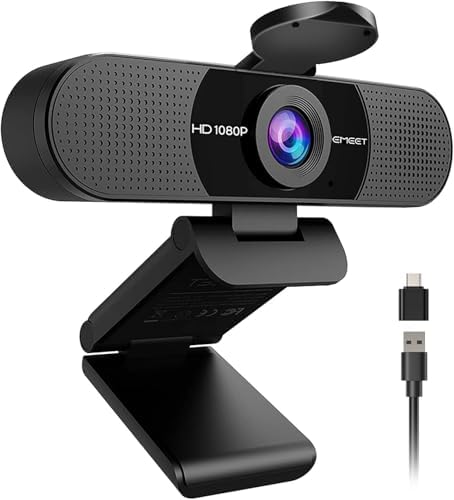
The proven budget answer for basic video calls: plug-and-play 1080p30, a wide 90-degree view and two decent mics at a price that undercuts everything else here.
The most budget-friendly camera in this comparison: 2K30 video from a 4MP sensor, autofocus with auto light correction, a wide 86-degree view and a snap-on privacy cover, reviewed by MacSources as an excellent value pick.
A palm-sized 4K webcam that PCWorld calls simply great: fast, accurate autofocus, AI framing and a magnetic body that flips into portrait mode, all around the $100 mark.
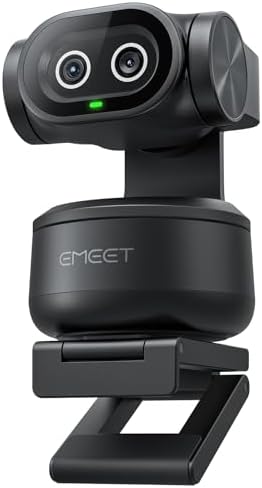
The first dual-camera AI PTZ webcam: a 4K Sony-sensor main camera paired with a dedicated AI camera for tracking, plus 310-degree pan and a 3-mic array that beats typical webcam audio.
The category's long-running default: dependable 1080p30 video, autofocus and light correction that just work the moment you plug it in, with a decade-plus track record behind it.
Short on time? These three cover most buyers: our Best Overall 4K pick, the Best Affordable webcam for basic calls, and the Best for Everyday Meetings pick with true 4K and real autofocus.
Understand the category before you buy - what the science actually says, and which specs matter.
Every webcam promises crisp video and clear audio, but the number printed largest on the box, the resolution, is often the least useful spec for how you actually appear on a call. Here is how a webcam works, why frame rate and sensor size quietly matter more than megapixels, and the features worth comparing before you buy.
What does a webcam actually do?
A webcam is a small camera and microphone in one housing that connects to your computer over USB and feeds video into whatever app you are using, whether that is Zoom, Teams, Google Meet, or a streaming tool like OBS. Inside, three parts do the heavy lifting:
A lens and image sensor that gather light and turn it into a picture.
A processor that sets exposure, white balance, and focus so you look right in changing light.
One or more microphones that pick up your voice, usually with some noise reduction.
The better a webcam handles ordinary room light and movement, the more you look like yourself instead of a blurry, laggy version of yourself.
Why frame rate and sensor size beat raw resolution
This is the part most shoppers get backwards. Resolution is how many pixels the image has. Frame rate is how many images per second the camera sends, and sensor size is how much light it can gather. For a live video call, the last two usually matter more.
Start with frame rate. Many cameras here, including the OBSBOT Tiny 2, the OBSBOT Meet 2, and the EMEET NOVA, top out at 4K at 30fps but also offer 1080p at 60fps. In a normally lit room, that smoother 1080p at 60fps often looks better on a call than 4K at 30fps, because your motion, your hand gestures, your head turns, stays fluid instead of stuttering. Most meeting software compresses your video down below 4K anyway, so the extra pixels rarely survive the trip, while the extra frames you feel immediately.
Then there is the sensor, which decides how you look when the light is less than perfect, meaning most home offices most of the day. A physically larger sensor gathers more light, so it produces a cleaner, less grainy image than a smaller sensor with more megapixels on paper. In this lineup the OBSBOT Tiny 2 uses a 1/1.5 inch sensor, larger than the 1/2 inch sensors in the OBSBOT Meet 2 and Tiny 2 Lite, which are in turn larger than the 1/2.55 inch Sony sensors in the EMEET PIXY and NOVA and the 1/2.9 inch sensor in the Logitech C920x. When you are lit by a single lamp or a gray window, that sensor difference shows up as the gap between "clear" and "noisy," and no amount of resolution closes it.
The takeaway: read the frame rate and the sensor size first, and treat the big "4K" badge as the tiebreaker, not the headline.
Which specs actually matter?
Once you know what drives image quality, a few features decide which webcam fits you:
Frame rate: Look for 1080p at 60fps if you move, gesture, or stream, since smooth motion reads as higher quality than a sharper but choppier picture. Fixed 30fps models like the EMEET C960 and Logitech C920x are fine for talking-head calls.
Sensor size: Bigger is better in low light. The 1/1.5 inch sensor on the OBSBOT Tiny 2 and the 1/2 inch sensors on the OBSBOT Meet 2 and Tiny 2 Lite have a real edge over smaller sensors when the room is dim.
Field of view: A narrow view around 73 to 79 degrees keeps the focus on you and hides a messy background, while a wider 90 to 95 degree view fits more people or your whole desk. The Anker PowerConf C200 lets you switch between 65, 78, and 95 degrees.
Autofocus: Fast, reliable autofocus like the phase-detect systems on the EMEET PIXY and NOVA keeps you sharp as you lean in and out. A fixed-focus camera like the EMEET C960 never hunts or drifts, which some people prefer for a locked-in shot.
Microphones: Dual or triple omnidirectional mics with noise reduction, found across most of this lineup, save you from buying a separate microphone for casual calls.
Tracking and framing: AI tracking and auto framing, as on the OBSBOT PTZ models, keep you centered if you move around, which is useful for standing presentations and less relevant if you sit still.
How we grade products
Graded Picks rankings are aggregated from several independent signals: verified buyer ratings and the size of the review base for credibility, recent monthly purchase volume for relevance, assessments from trusted tech and video publications, and how each product places in leading category lineups. For webcams we weigh:
Image quality in real room lighting
Frame rate and motion smoothness
Sensor size and low-light performance
Autofocus speed and reliability
Field of view flexibility
Built-in microphone quality
Ease of setup and app support
Overall value for the price
Setup and lighting note: The single biggest upgrade to how you look on camera is not the webcam, it is the light in front of you. Face a window or a lamp rather than sitting with a bright window behind you, which turns you into a silhouette even on the best sensor here. Mount the camera at or slightly above eye level, keep the USB connection direct to your computer when you can, and cover the lens with the built-in privacy shutter when you are done.
In-Depth Reviews
Everything we learned from buyer reviews and expert testing, product by product.
OBSBOT Tiny 2
Best Overall30% OFF
1. OBSBOT Tiny 2 4K PTZ Webcam (Voice Control)
5.0
Our Best Overall pick. The Tiny 2 is the most capable camera in this comparison, and expert testing backs it up: PCWorld called it a stellar webcam upgraded further, and Tom's Guide's reviewer joked it might be smarter than they are. The 1/1.5-inch, 50MP sensor is the largest here by a wide margin, and OBSBOT's all-pixel autofocus uses every pixel on it for focusing the company rates as 4x faster - producing sharp, natural, high-dynamic-range 4K30 that visibly outclasses smaller-sensor rivals in dim rooms. Its 2-axis motorized gimbal handles AI tracking with auto zoom, and it layers voice commands on top of gesture control, so you can reframe, zoom or start tracking without touching the keyboard - genuinely useful mid-presentation. USB 3.0 delivers uncompressed 1080p and headroom 4K needs. The catch is simple: at its price you are paying roughly ten times what a basic 1080p camera costs, its full powers live in the same Center software as its Lite sibling, and for buyers who don't need the bigger sensor or voice control, the Tiny 2 Lite below gets remarkably close for far less.
Max resolution4K@30fps / 1080p@60fps
Sensor1/1.5" CMOS, 50MP
Field of view85.5°
AutofocusAll-pixel autofocus with AI tracking + auto zoom
MicrophonesDual with noise reduction
ConnectionUSB-C 3.0
Warranty1 year
Pros
Our Best Overall pick: largest sensor in this comparison - visibly cleaner low-light video
All-pixel autofocus locks focus dramatically faster than rivals
Voice commands plus gestures control tracking hands-free
Motorized gimbal tracking with auto zoom and desk mode
USB 3.0 bandwidth for uncompressed 1080p output
Cons
Costs several times more than very capable mid-range options
Depends on OBSBOT Center software for its full feature set
Overkill for static talking-head calls - the Lite covers most of it for less
Who is it for?
Our Best Overall pick for content creators, streamers and executives who want the best image quality and hands-free camera control available in a webcam form factor.
Who is it not for?
Value-focused buyers - the Tiny 2 Lite below delivers most of this experience at a fraction of the price.
The Tiny 2 Lite delivers most of what OBSBOT's flagship Tiny 2 does at a much lower price, and it backs that value up with unusually broad, positive expert coverage. XDA's review headline captured the consensus: almost all the quality for a fraction of the cost. PC Gamer, GamesRadar and multiple specialist outlets praised sharp, polished 4K30 video from its 1/2-inch, 48MP sensor and an f/1.8 lens that holds up in dim rooms. The motorized pan-tilt gimbal tracks you around the room hands-free, with upper-body and hand tracking, custom tracking zones, preset positions and gesture control that together make it far more adaptable than a fixed webcam for teaching, presenting and creator work. The honest caveats from testing: the full feature set lives in OBSBOT's Center software, which reviewers find less polished than the hardware, and some testers hit audio dropouts while recording with AI features active, one more reason to pair any webcam with a separate microphone for serious work.
Max resolution4K@30fps / 1080p@60fps
Sensor1/2" CMOS, 48MP
Field of view79.4° (diagonal)
AutofocusAI autofocus with motorized PTZ tracking
MicrophonesDual omnidirectional with noise cancellation
ConnectionUSB-C (USB-A adapter included)
Warranty1 year
Pros
Motorized PTZ tracking with gesture control at a mid-range price
Sharp 4K30 video experts call polished for meetings and streams
Upper-body and hand tracking plus custom tracking zones
f/1.8 lens and 1/2-inch sensor hold up well in dim rooms
Broad, consistently positive expert coverage
Cons
Full feature set requires OBSBOT's Center software, which needs polish
Some testers hit audio dropouts with AI features enabled while recording
4K tops out at 30fps - streamers wanting 60fps must drop to 1080p
Who is it for?
Teachers, presenters and creators who move around on camera and want flagship-grade AI tracking without paying flagship money.
Who is it not for?
Static talking heads on basic video calls - a fixed webcam like the EMEET C960 above covers that for a tenth of the price.
The NOVA 4K earns our Best for Everyday Meetings ribbon because it covers what a daily call actually needs: phase-detect autofocus that reviewers found accurate at tracking subjects without hunting, auto light correction, dual omnidirectional noise-canceling microphones and an included privacy cover, all at a price well below the lineup's AI-tracking flagships. Shotkit's testing praised its video and sound quality as impressive for the money, calling it compact and portable without compromising quality, and the deep manual controls for brightness, white balance, saturation and sharpness give buyers real scope to dial in their image beyond the defaults. That control is also the honest catch reviewers keep returning to: out-of-the-box defaults are subpar, and getting exposure, white balance and the AI settings working together takes real time in EMEET's companion software, a meaningful ask for buyers who just want to plug in and look good. Two more limits worth knowing: 4K is capped at 30fps with 60fps only available at 1080p, and the autofocus needs decent light to lock onto the right subject reliably. Even without motorized tracking, true 4K image quality, dual mics, a privacy cover and a 2-year warranty at this price is a combination most of the lineup can't match.
Max resolution4K@30fps / 1080p@60fps
Sensor1/2.55" Sony CMOS
Field of view73°
AutofocusPDAF (phase-detect)
MicrophonesDual omnidirectional, noise-canceling
ConnectionUSB-A
Warranty2 years
Pros
True 4K30 capture with phase-detect autofocus at a mid-budget price
Deep manual controls for exposure, white balance and color
Dual noise-canceling mics reviewers rate clearly adequate for calls
Privacy cover included in the box
2-year warranty, double most webcams here
Cons
Out-of-the-box defaults are subpar - expect real setup time in the software
Autofocus needs good light and can lock onto the wrong subject in dim rooms
4K capped at 30fps; 60fps requires dropping to 1080p
Who is it for?
Remote workers and anyone on daily video meetings who wants a sharp, autofocusing 4K camera with decent mics at a fair price, and is comfortable spending an hour in settings.
Who is it not for?
Plug-and-play buyers who want to look good immediately with zero configuration, who will be happier with the budget EMEET C960.
The C960 is the value anchor of this comparison, and it earns that role for exactly the reasons PCWorld's review identified: low-cost, popular for a reason, and more than good enough for its intended purpose of joining video calls looking clearly better than a built-in laptop camera. There are no drivers and no companion-software homework - plug the USB-A cable in and it works with Zoom, Teams, Meet and even the Nintendo Switch 2's camera mode. Four anti-glare lens layers and automatic light correction keep the 1080p30 image steady, and its two omnidirectional microphones pick up voices within a couple of meters with basic noise reduction. The compromises are honest and expected at this price: it's a fixed-focus lens, so there's no autofocus to hunt but also none to help close-up work; testers found it middling in dim rooms and recommend facing a window or screen; and the 90-degree field of view shows a lot of background for a solo caller. As a first webcam or a spare for a second desk, nothing here matches its price-to-usefulness ratio.
Max resolution1080p@30fps
SensorCMOS with 4-layer anti-glare lens
Field of view90°
AutofocusFixed focus (no hunting, ~1-10 ft sharp range)
MicrophonesDual omnidirectional with noise reduction
ConnectionUSB-A (USB-C adapter included)
Warranty2 years
Pros
Lowest price in this comparison by a wide margin
True plug-and-play - no drivers or companion software needed
Wide 90-degree view fits two people or a demo table
Auto light correction keeps exposure steady on calls
Works with Zoom, Teams, Meet and Switch 2 GameChat out of the box
Cons
Fixed focus means close-up detail work goes soft
Middling in dim rooms - it wants a window or ring light
90-degree view is wider than ideal for a tight solo shot
Who is it for?
Budget buyers, students and anyone outfitting a second desk who wants a clear upgrade over a laptop camera for the price of a lunch out.
Who is it not for?
Creators and streamers who need 4K detail, autofocus or tracking - every other camera in this lineup outclasses it on image quality.
The UGREEN 2K is the entry point of this comparison, pairing a 4MP CMOS sensor and 2K30 capture with autofocus and automatic light correction that keeps exposure steady without any manual tweaking. MacSources's review called it an excellent value option that delivers clear video quality and thoughtful design in a sleek, portable build, and highlighted the plug-and-play setup that needs no drivers, just a USB-A port. Dual noise-canceling microphones pick up voices from up to 3 meters away, and a snap-on privacy cover blocks the lens between calls with nothing separate to lose. Its 86-degree field of view is wider than the presentation-focused cameras elsewhere in this lineup, fitting more of a desk or a second person into frame. The honest tradeoffs MacSources and other testers flag: there's no USB-C connector for newer laptops, the dual mics can pick up more ambient room noise than a single directional mic would, and image quality leans soft in dim rooms next to the larger-sensor cameras above. At its price, it undercuts every other camera in this comparison while still covering the fundamentals most casual callers need.
Max resolution2K@30fps
Sensor4MP CMOS
Field of view86° (diagonal)
AutofocusAutofocus with auto light correction
MicrophonesDual noise-canceling (up to 3m pickup)
ConnectionUSB-A
Warranty1 year
Pros
Lowest price of any webcam in this comparison
2K30 video with autofocus and automatic light correction
Wide 86-degree field of view fits more of the room in frame
Snap-on privacy cover included, nothing separate to lose
Reviewed by MacSources as an excellent value pick with a sleek, portable build
Cons
No USB-C connector - USB-A only, unlike some pricier rivals here
Dual mics can pick up more ambient noise than a single directional mic
Image quality softens in dim rooms next to the larger-sensor cameras in this lineup
Who is it for?
Budget shoppers and second-desk setups who want a clear step up from a laptop camera without spending much.
Who is it not for?
Anyone prioritizing low-light image quality or motorized tracking - the OBSBOT and EMEET models above are built for that.
The Meet 2 is one of the tiniest 4K webcams ever made - about 1.5 ounces - and it has drawn a remarkable spread of positive expert coverage for its price, from PCWorld's simply great verdict to reviews at Tom's Guide, PC Gamer and Digital Camera World. Its 1/2-inch sensor delivers 4K at 30fps or 1080p at 60fps, and testers consistently highlight autofocus that stays sharp as you move toward or away from the camera along with low-light performance far beyond any built-in laptop camera. AI framing and gesture control come from the same software family as OBSBOT's PTZ models, minus the motorized gimbal, and three magnetic sides let it snap into portrait orientation for vertical video. The weaknesses reviewers flag are practical ones: the magnetic monitor mount is the flimsiest part of the package and a stiff USB-C cable can knock the camera off its perch, and the built-in microphone is mediocre enough that serious callers will want an external mic.
Max resolution4K@30fps / 1080p@60fps
Sensor1/2" CMOS, 48MP
Field of view79.4° (diagonal)
AutofocusFast AI autofocus with auto framing
MicrophonesDual microphones
ConnectionUSB-C
Warranty1 year
Pros
Sharp 4K video from a body that fits in a palm
Fast, accurate autofocus praised across expert reviews
Magnetic sides snap into portrait mode for vertical video
Some of the most sophisticated webcam software in its class
Strong low-light performance for the price
Cons
Magnetic mount is fragile - a stiff cable can knock the camera off
Built-in microphone is mediocre for professional calls
Privacy protection is a small snap-on magnetic cover, easy to misplace
Who is it for?
Hybrid workers and creators who want genuinely excellent 4K image quality and portrait-mode flexibility in the smallest possible package.
Who is it not for?
Anyone who needs motorized tracking that follows them around a room - that's the Tiny 2 Lite and Tiny 2 elsewhere in this lineup.
The PIXY stands out with a party trick that's genuinely novel: alongside its 4K main camera with a 1/2.55-inch Sony sensor sits a second, dedicated AI camera whose only job is watching and tracking the subject - which is how it can pan through 310 degrees and tilt 180 degrees without ever losing you. Reviewers at Fstoppers, Digital Camera World and PC Gamer found the AI-tuned 4K footage sharp and natural-looking with balanced highlights even against backlighting, and the three-microphone array with three sound modes (original, noise canceling, live) is a genuine step up from the usual webcam mic. Gesture control, preset positions and 0.2-second phase-detect autofocus round out a spec sheet aimed squarely at streamers and educators. The honest tradeoffs: its 73-degree field of view is tighter than most rivals here, which suits solo framing but not group shots, the fast-moving PTZ hardware has more moving parts to trust than a fixed camera, and EMEET's Studio software - while feature-rich - adds a learning curve that plug-and-play buyers won't want.
Max resolution4K@30fps
Sensor1/2.55" Sony CMOS
Field of view73° (310° pan / 180° tilt range)
AutofocusPDAF + AI autofocus (0.2s)
Microphones3-mic array with 3 sound modes
ConnectionUSB-C (USB-A adapter included)
Warranty2 years
Pros
Dedicated second AI camera keeps tracking even at extreme pan angles
310-degree pan and 180-degree tilt far beyond digital-only rivals
Sharp, natural 4K from a Sony sensor with strong backlight handling
3-mic array with selectable sound modes beats typical webcam audio
2-year warranty, double most webcams here
Cons
73-degree field of view is tight for group or room shots
Motorized dual-camera hardware means more moving parts than a fixed cam
EMEET Studio software has a real learning curve for casual users
Who is it for?
Streamers, educators and presenters who move constantly and want mechanical tracking that never loses them, plus better-than-average built-in audio.
Who is it not for?
Buyers who want a simple, wide-angle camera for static group calls - the wide-angle EMEET C960 suits that far better.
The C920x is the webcam most people picture when they hear the word, and expert coverage published this year keeps reaching the same conclusion: for anyone who just wants to look crisp and professional on calls, it remains one of the smartest, most reliable purchases in the category. It plugs in and works immediately - no drivers, no configuration - and its 1080p30 video with a glass lens, f/2.0 aperture and automatic light correction still produces dramatically better image quality than any built-in laptop camera. The 78-degree field of view frames a solo caller naturally, and Logitech's long software support means it works with everything from Teams and Zoom to the Nintendo Switch 2's GameChat mode. Its age shows in two places reviewers consistently flag: the autofocus is slow by modern standards and visibly hunts if you move around or hold products up to the lens, and the once-impressive stereo mics now sound thin and roomy next to current rivals. Neither matters much for a static talking head - which is exactly the job this camera has been quietly perfecting for over a decade.
Max resolution1080p@30fps
Sensor1/2.9" CMOS, glass lens
Field of view78°
AutofocusAutofocus (contrast-detect)
MicrophonesDual stereo
ConnectionUSB-A
Warranty1 year limited
Pros
Plugs in and works instantly - no drivers or setup at all
Dependable, natural-looking 1080p that made it the category default
Glass lens with automatic light correction for steady exposure
Works with Teams, Zoom, Meet and Switch 2 GameChat
Over a decade of proven reliability and driver support
Cons
Autofocus is slow and hunts visibly when you move or show objects
Stereo mics sound thin and echoey by modern standards
No 4K, tracking or HDR - the spec sheet shows its age
Who is it for?
Anyone who wants the proven, zero-fuss choice for everyday meetings and calls - it simply works, and keeps working.
Who is it not for?
Creators who move on camera, film products up close, or want modern 4K sharpness - the OBSBOT and EMEET models above are built for that.
The stars you see are the Graded Picks cumulative score, not a single retailer's average. It blends verified buyer reviews aggregated across major retailers, assessments from professional reviewers and expert testers, and how prominently the product features in leading category lineups.
Advertising Disclosure
Our rankings are compiled by aggregating several independent signals, including verified buyer feedback, how popular a product currently is with shoppers, and evaluations published by professional reviewers. Editorial opinions are our own.
Please note that we participate in affiliate marketing programs. When you purchase through links on our site, we may earn a commission. As an Amazon Associate we earn from qualifying purchases. This comes at no additional cost to you and helps support the resources required to provide valuable content.