When the WiFi drops in the back bedroom or grinds to a crawl the moment everyone is home, a wireless access point is the fix that actually holds up. It plugs into the network you already have and blankets a room, a floor, or a whole building with strong, dense signal. But an access point is not a router, and buying one as if it were is where most people go wrong. We analyzed thousands of verified buyer reviews, recent sales data, and expert evaluations to find six wireless access points that deliver fast, reliable coverage without a fight.
Every product we compared, in ranked order. Tap through to Amazon to check today's price, or jump to the full review below.
1
TP-Link EAP720
Best Overall
TP-Link Omada EAP720 WiFi 7 Access Point
5.0
Wi-Fi 7 · 1,500 sq ft coverage · 2.5G port
Our Best Overall pick: TP-Link's entry point into Wi-Fi 7, with a 2.5G uplink and flexible PoE+ or DC power that make it easy to drop into an existing wired network.
TP-Link Omada EAP770 WiFi 7 Access Point (Tri-Band)
4.9
Wi-Fi 7 tri-band · 1,500 sq ft coverage · 2.5G port
Our Best for Multi-Device Homes pick: TP-Link's tri-band step-up, adding the 6 GHz band and the highest advertised device capacity in this lineup for busier networks than the EAP720 handles.
Our Best Affordable pick: a dual-band Wi-Fi 7 router that doubles as an access point, with dual 2.5 Gbps ports and 2,400 sq ft of rated coverage for less than any dedicated access point in this lineup.
WAVLINK AX1800 Outdoor WiFi 6 Access Point (WN573HX1)
4.6
Wi-Fi 6 AX1800 · IP67 outdoor · 4x 8dBi antennas
A weatherproof IP67 Wi-Fi 6 access point with four 8dBi antennas and single-cable PoE, built to push Wi-Fi across a yard, farm or campsite rather than around a living room.
Short on time? These three cover most buyers: our Best Overall Wi-Fi 7 access point, the Best Affordable pick for covering a larger home on a budget, and the Best for Multi-Device Homes pick for networks with a lot of simultaneous devices.
Wireless Access Points 101: What They Do & How to Choose
Understand the category before you buy - what the science actually says, and which specs matter.
Every product in this space promises more speed and more coverage, but the way an access point connects to your network is what sets it apart from the mesh kit at the electronics store. Here is how an access point works, the one distinction that decides your whole purchase, and the specs actually worth comparing.
What does a wireless access point actually do?
A wireless access point takes a wired network connection and turns it into WiFi. You run an ethernet cable to it, and it broadcasts a strong signal to every phone, laptop, tablet, and smart device in range. Think of it as a dedicated antenna for a network that already exists, rather than the brain that runs the network.
In plain terms, an access point does three things:
Adds fast, reliable WiFi to a specific area, indoors or across a property.
Connects back to your router or switch by a single ethernet cable.
Handles many devices at once without the slowdown a consumer router hits when the house fills up.
An access point is not a router, and that is the whole decision
This is the insight that saves you from buying the wrong box. A router creates and manages your network: it hands out addresses, connects to the internet, and includes firewall and other duties. An access point does none of that. It plugs into a router or a switch and simply adds excellent WiFi where you need it. Knowing this is the entire buying decision, because a true access point beats a consumer mesh when you need to cover a big house or office and keep many devices fast at the same time.
You can see the split right inside this lineup. The Ubiquiti U6+, the TP-Link Omada models (the EAP720 and the tri-band EAP770), and the WAVLINK AX1800 outdoor unit are purpose-built access points, while the TP-Link Archer BE400 is a router that doubles as one in access-point mode: all of them run on Power over Ethernet or a wall adapter and expect a network already in place. One other product here, the UeeVii CPE452, is a point to point outdoor bridge that links two buildings over a wireless beam rather than broadcasting Wi-Fi directly into a room. All can carry Wi-Fi, but only the dedicated access points are built to be mounted and fed by a single cable at one site, so match the product to the job before anything else.
The feature that makes an access point install cleanly is that same PoE. One ethernet cable carries both the data and the power, so you can mount the unit on a ceiling or high on a wall with no electrical outlet anywhere nearby. The Ubiquiti U6+ uses 802.3at PoE+ with an injector, while the Omada EAP720 and EAP770 accept PoE+ or an included 12V DC adapter if you would rather plug into the wall.
Which specs actually matter?
Once you know it is an access point you want, a handful of specs decide which one fits:
WiFi standard: This sets the ceiling on speed and how well the unit handles a crowd. The lineup spans WiFi 5 (802.11ac) on the two UeeVii bridges, WiFi 6 (802.11ax) on the Ubiquiti U6+ and the WAVLINK outdoor unit, and WiFi 7 (802.11be) on the TP-Link Omada models. Newer standards move more data to more devices at once.
Rated speed: Ratings here run from a roughly 3 Gbps aggregate on the U6+ up to the BE11000 class near 11 Gbps on the EAP770. This is a shared ceiling across all connected devices, not a per-device promise.
Client capacity: The number that matters in a busy space. Advertised device counts range from 128 on the outdoor WAVLINK unit to 250+ on the EAP720, 300+ on the U6+ and 380+ on the EAP770, so weigh capacity if you have a lot of phones, laptops, and smart devices.
Bands: Dual-band units use 2.4 GHz and 5 GHz. The EAP770 is tri-band and adds 6 GHz, which opens a wide, less crowded lane for newer devices.
Ports and uplink: A faster uplink prevents the wired connection from becoming the bottleneck. The U6+ uses a single Gigabit port, while the Omada EAP720 and EAP770 step up to a 2.5G port.
Power and mounting: PoE+ support is what lets you mount on a ceiling or wall cleanly. Confirm whether an injector is included, as it is separate on the U6+ and bundled on the Omada units.
Coverage area: Advertised coverage runs from 1,500 sq ft on several models here up to larger footprints, though real range depends on walls, floors, and interference.
How we grade products
Graded Picks rankings are aggregated from several independent signals: verified buyer ratings and the size of the review base for credibility, recent monthly purchase volume for relevance, assessments from trusted networking publications, and how each product places in leading category lineups. For wireless access points we weigh:
WiFi standard and rated speed
Client capacity under load
Real-world coverage and signal strength
Power options and mounting flexibility
Port speed and uplink headroom
Setup, management software, and security support
Overall value for the price
Setup note: A wireless access point needs an existing network to plug into, so it cannot replace your router or modem on its own. To use PoE, you also need a PoE switch or a PoE injector to send power down the ethernet cable. Check that your uplink port speed matches the access point, and confirm whether an injector is in the box before you buy.
In-Depth Reviews
Everything we learned from buyer reviews and expert testing, product by product.
TP-Link EAP720
Best Overall
1. TP-Link Omada EAP720 WiFi 7 Access Point
5.0
Our Best Overall pick. The EAP720 pairs genuinely current Wi-Fi 7 hardware with the easiest path onto an existing wired network of anything here. It brings Wi-Fi 7's Multi-Link Operation and 4K-QAM to a ceiling-mount access point without the premium price of tri-band models. Reviewers note strong, stable 5 GHz throughput in busy households, with noticeably fewer buffering incidents during 4K streaming and large file transfers compared to older Wi-Fi 6 hardware. A 2.5G Ethernet port keeps the wired backhaul from becoming a bottleneck as multi-gig internet plans spread, and it ships with a DC adapter so it can be tested immediately without a PoE switch on hand. Like other Omada access points, it works standalone but becomes considerably more capable, adding centralized management, seamless roaming and guest portals, once adopted into TP-Link's free Omada software. Reviewers flag that most current client devices don't yet fully exploit Wi-Fi 7, so the day-to-day gain over Wi-Fi 6E is incremental for now, but the 5-year EU spare-parts backing signals TP-Link expects this hardware to stay relevant.
2. TP-Link Omada EAP770 WiFi 7 Access Point (Tri-Band)
4.9
The EAP770 earns our Best for Multi-Device Homes pick as the highest-capacity access point in this comparison, rated for 380+ concurrent clients versus 300+ on the Ubiquiti U6+ and 250+ on its own sibling, the EAP720. It's TP-Link's first tri-band Omada access point, adding a 6 GHz radio (5765 Mbps) on top of the 5 GHz (4324 Mbps) and 2.4 GHz (688 Mbps) bands for a combined BE11000 rating. Networking reviewers describe it as the best default indoor pick for standard multi-AP Omada installs, particularly in homes and small offices juggling many simultaneous devices, thanks to seamless roaming between access points. Like the EAP720, it takes 802.3at PoE+ or the included 12V DC adapter and mounts to a ceiling or wall, and it plugs into the same free Omada SDN for centralized management, WPA3 encryption and guest networking. The main trade-off is price relative to the entry-level EAP720 for a spec bump - the extra 6 GHz band - that only benefits client devices that actually support it, which in 2026 is still a growing minority of laptops and phones.
The Archer BE400 is technically a router, but its access-point mode and generous coverage rating make it the most affordable way into Wi-Fi 7 speed across a large home in this lineup. Independent lab testing found fast, stable 5 GHz throughput at short and long range that holds up against pricier flagship routers, thanks to a four-stream 5 GHz radio. The dual 2.5 Gbps ports (one WAN, one LAN) and a USB 3.0 port add practical multi-gig flexibility that's rare at this price, and TP-Link's HomeShield suite layers in parental controls and network security. Testing did flag two real weaknesses: the 2.4 GHz band runs noticeably slower at long range than other TP-Link routers, and enabling Wi-Fi 7's Multi-Link Operation currently degrades performance rather than improving it, so reviewers recommend leaving MLO off until a firmware fix lands. At $114.99, it still undercuts every dedicated access point in this comparison while covering more square footage on paper than any of them, which is why it earns our Best Affordable pick.
Wi-Fi standardWi-Fi 7 (802.11be), dual-band (no 6GHz)
Max combined throughputBE6500 (~6.5 Gbps combined rating)
The CPE452 solves a different problem than the other products in this comparison: it's sold as a matched 2-piece kit that beams a wired connection wirelessly between two buildings, commonly used to reach a detached garage, barn or workshop, or to extend a Starlink connection and a security camera feed. Each unit uses a 14dBi high-gain antenna on the 5.8 GHz band to link the pair at up to 300 Mbps over line-of-sight distances the company rates at up to 3 km, well beyond what a standard indoor access point or extender can manage. The units ship pre-paired and are IP65 weatherproof for permanent outdoor mounting, with 24V PoE power and automatic power adjustment to compensate for weather and interference. Because it needs a clear line of sight between the two mounting points and both units must be aimed at each other, it's a specialist tool rather than a general Wi-Fi upgrade, and independent professional testing beyond a handful of installation walkthroughs is thin.
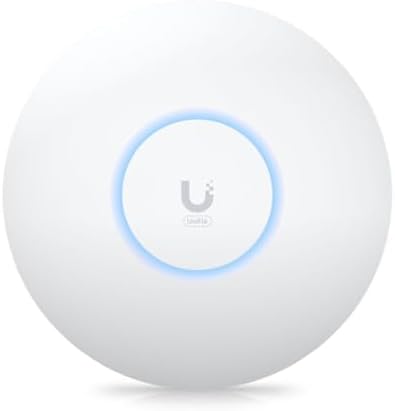
The UniFi U6+ is the enterprise option in this lineup, and it gives up very little for the money. Networking reviewers call it a sweet spot for anyone willing to run Ubiquiti's free UniFi controller software. It combines Wi-Fi 6 efficiency features such as OFDMA and MU-MIMO with roughly 3 Gbps of aggregate throughput and enough capacity for 300 or more simultaneously connected devices, all from a compact fanless enclosure that mounts discreetly on a wall or ceiling. Setup is not plug-and-play: reviewers are consistent that the U6+ rewards anyone comfortable adopting it into a UniFi controller or cloud console, and it needs an 802.3at PoE+ injector or switch that isn't included in the box, which adds to the real cost. In exchange you get enterprise-grade guest networking, VLANs and detailed traffic monitoring that consumer mesh systems don't offer at this price.
Wi-Fi standardWi-Fi 6 (802.11ax), dual-band
Max combined throughput~3 Gbps aggregate (2.4 GHz + 5 GHz)
Coverage area (advertised)1,500 sq ft, 300+ devices
Ports & uplink1x Gigabit Ethernet
Power options802.3at PoE+ (injector sold separately)
SecurityWPA2/WPA3 (via UniFi controller)
Warranty1-2 years (Ubiquiti standard limited warranty)
Pros
Enterprise-grade UniFi software gives detailed monitoring, VLANs and guest networking
Strong Wi-Fi 6 throughput and reliable multi-device handling
Compact, fanless design mounts unobtrusively on wall or ceiling
Backed by a large, well-established professional installer community
Cons
PoE+ injector or switch is not included and must be bought separately
UniFi controller setup is not beginner-friendly for first-time networkers
Single Gigabit Ethernet port limits backhaul versus newer multi-gig access points
Who is it for?
Home labs, small offices and anyone who already runs (or wants to learn) Ubiquiti's UniFi ecosystem and cares more about configurability than plug-and-play simplicity.
Who is it not for?
Buyers who want to unbox an access point, plug it in and never open an app again, since the TP-Link Omada units in this lineup are a simpler fit.
6. WAVLINK AX1800 Outdoor WiFi 6 Access Point (WN573HX1)
4.6
The WN573HX1 (sold as the AERIAL HD6) solves an outdoor problem the indoor access points in this lineup cannot: an IP67 sealed housing with surge protection, four detachable 8dBi omni antennas and a single Gigabit port that takes passive or 802.3af/at PoE, so one cable carries both data and power to a pole, barn or eave. It is a dual-band Wi-Fi 6 radio rated AX1800 (about 574 Mbps on 2.4 GHz and 1,201 Mbps on 5 GHz) with MU-MIMO and support for 128 devices, and it can run as an access point, repeater, mesh extender or router. Hands-on coverage from PC Tech Kits and Mini PC Reviewer describes it as a strong fit for open spaces, with the usual caveats: the web interface feels dated, real range falls well short of the advertised open-field figure through trees and buildings, and the PoE injector is not weatherproof and must stay indoors. Buyer feedback is mixed on setup and support, so it suits people comfortable with basic networking.
The stars you see are the Graded Picks cumulative score, not a single retailer's average. It blends verified buyer reviews aggregated across major retailers, assessments from professional reviewers and expert testers, and how prominently the product features in leading category lineups.
Advertising Disclosure
Our rankings are compiled by aggregating several independent signals, including verified buyer feedback, how popular a product currently is with shoppers, and evaluations published by professional reviewers. Editorial opinions are our own.
Please note that we participate in affiliate marketing programs. When you purchase through links on our site, we may earn a commission. As an Amazon Associate we earn from qualifying purchases. This comes at no additional cost to you and helps support the resources required to provide valuable content.